
A
network diagram is a visual representation of a computer or telecommunications network. It illustrates the
arrangement and interconnections of network components, including servers, routers, switches, hubs, and devices. Network diagrams are invaluable tools for network engineers and administrators to
understand, set up, and troubleshoot networks. They are also essential for
visualizing the structure and flow of data in a network, ensuring optimal performance and security.
nwdiag, developed by
Takeshi Komiya, provides a streamlined platform to swiftly sketch
network diagrams. We extend our gratitude to Takeshi for this
innovative tool!
Given its intuitive syntax,
nwdiag has been seamlessly integrated into
PlantUML. The examples showcased here are inspired by the ones documented by
Takeshi.
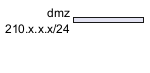
Define a network
|
🎉 Copied!
|
@startnwdiag
nwdiag {
network dmz {
address = "210.x.x.x/24"
}
}
@endnwdiag
|
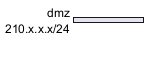
Or simply:
|
🎉 Copied!
|
@startnwdiag
network dmz {
address = "210.x.x.x/24"
}
@endnwdiag
|
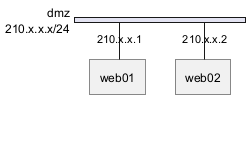
Define some elements or servers on a network
|
🎉 Copied!
|
@startnwdiag
nwdiag {
network dmz {
address = "210.x.x.x/24"
web01 [address = "210.x.x.1"];
web02 [address = "210.x.x.2"];
}
}
@endnwdiag
|
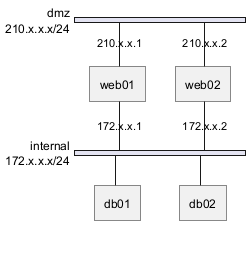
Full example
|
🎉 Copied!
|
@startnwdiag
nwdiag {
network dmz {
address = "210.x.x.x/24"
web01 [address = "210.x.x.1"];
web02 [address = "210.x.x.2"];
}
network internal {
address = "172.x.x.x/24";
web01 [address = "172.x.x.1"];
web02 [address = "172.x.x.2"];
db01;
db02;
}
}
@endnwdiag
|
|
🎉 Copied!
|
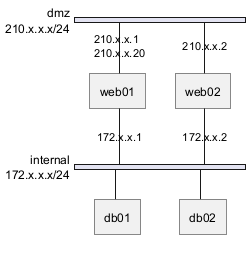
@startnwdiag
nwdiag {
network dmz {
address = "210.x.x.x/24"
// set multiple addresses (using comma)
web01 [address = "210.x.x.1, 210.x.x.20"];
web02 [address = "210.x.x.2"];
}
network internal {
address = "172.x.x.x/24";
web01 [address = "172.x.x.1"];
web02 [address = "172.x.x.2"];
db01;
db02;
}
}
@endnwdiag
|
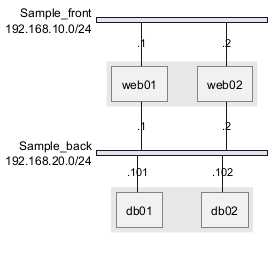
Define group inside network definitions
|
🎉 Copied!
|
@startnwdiag
nwdiag {
network Sample_front {
address = "192.168.10.0/24";
// define group
group web {
web01 [address = ".1"];
web02 [address = ".2"];
}
}
network Sample_back {
address = "192.168.20.0/24";
web01 [address = ".1"];
web02 [address = ".2"];
db01 [address = ".101"];
db02 [address = ".102"];
// define network using defined nodes
group db {
db01;
db02;
}
}
}
@endnwdiag
|
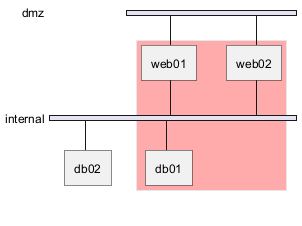
Define group outside of network definitions
|
🎉 Copied!
|
@startnwdiag
nwdiag {
// define group outside of network definitions
group {
color = "#FFAAAA";
web01;
web02;
db01;
}
network dmz {
web01;
web02;
}
network internal {
web01;
web02;
db01;
db02;
}
}
@endnwdiag
|
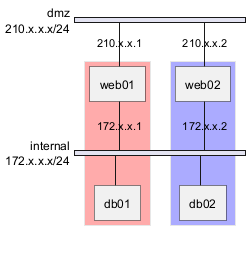
Define several groups on same network
Example with 2 group
|
🎉 Copied!
|
@startnwdiag
nwdiag {
group {
color = "#FFaaaa";
web01;
db01;
}
group {
color = "#aaaaFF";
web02;
db02;
}
network dmz {
address = "210.x.x.x/24"
web01 [address = "210.x.x.1"];
web02 [address = "210.x.x.2"];
}
network internal {
address = "172.x.x.x/24";
web01 [address = "172.x.x.1"];
web02 [address = "172.x.x.2"];
db01 ;
db02 ;
}
}
@endnwdiag
|
[Ref. QA-12663]
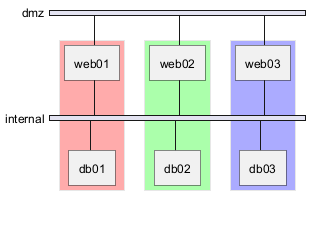
Example with 3 groups
|
🎉 Copied!
|
@startnwdiag
nwdiag {
group {
color = "#FFaaaa";
web01;
db01;
}
group {
color = "#aaFFaa";
web02;
db02;
}
group {
color = "#aaaaFF";
web03;
db03;
}
network dmz {
web01;
web02;
web03;
}
network internal {
web01;
db01 ;
web02;
db02 ;
web03;
db03;
}
}
@endnwdiag
|
[Ref. QA-13138]
Network
For network or network's component, you can add or change:
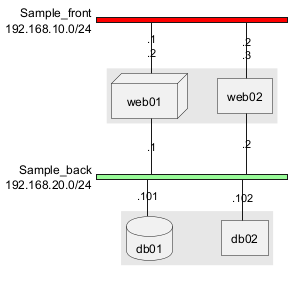
- addresses (separated by comma
,);
- color;
- description;
- shape.
|
🎉 Copied!
|
@startnwdiag
nwdiag {
network Sample_front {
address = "192.168.10.0/24"
color = "red"
// define group
group web {
web01 [address = ".1, .2", shape = "node"]
web02 [address = ".2, .3"]
}
}
network Sample_back {
address = "192.168.20.0/24"
color = "palegreen"
web01 [address = ".1"]
web02 [address = ".2"]
db01 [address = ".101", shape = database ]
db02 [address = ".102"]
// define network using defined nodes
group db {
db01;
db02;
}
}
}
@endnwdiag
|
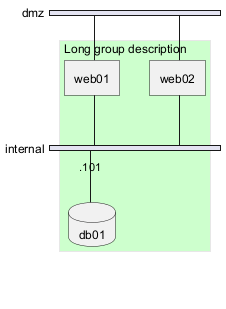
Group
For a group, you can add or change:
|
🎉 Copied!
|
@startnwdiag
nwdiag {
group {
color = "#CCFFCC";
description = "Long group description";
web01;
web02;
db01;
}
network dmz {
web01;
web02;
}
network internal {
web01;
web02;
db01 [address = ".101", shape = database];
}
}
@endnwdiag
|
[Ref. QA-12056]
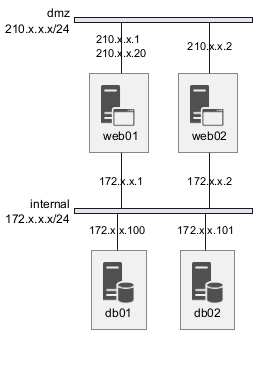
You can use all
sprites (icons) from the
Standard Library or any other library.
Use the notation
<$sprite> to use a sprite,
\n to make a new line, or any other
Creole syntax.
|
🎉 Copied!
|
@startnwdiag
!include <office/Servers/application_server>
!include <office/Servers/database_server>
nwdiag {
network dmz {
address = "210.x.x.x/24"
// set multiple addresses (using comma)
web01 [address = "210.x.x.1, 210.x.x.20", description = "<$application_server>\n web01"]
web02 [address = "210.x.x.2", description = "<$application_server>\n web02"];
}
network internal {
address = "172.x.x.x/24";
web01 [address = "172.x.x.1"];
web02 [address = "172.x.x.2"];
db01 [address = "172.x.x.100", description = "<$database_server>\n db01"];
db02 [address = "172.x.x.101", description = "<$database_server>\n db02"];
}
}
@endnwdiag
|
[Ref. QA-11862]
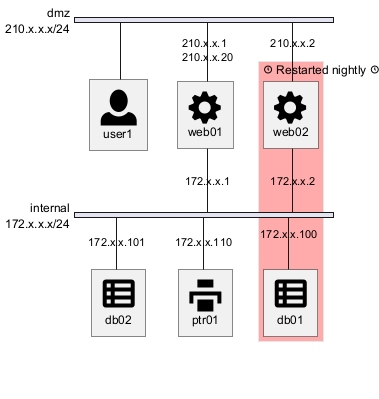
You can also use the icons from
OpenIconic in network or node descriptions.
Use the notation
<&icon> to make an icon,
<&icon*n> to multiply the size by a factor
n, and
\n to make a newline:
|
🎉 Copied!
|
@startnwdiag
nwdiag {
group nightly {
color = "#FFAAAA";
description = "<&clock> Restarted nightly <&clock>";
web02;
db01;
}
network dmz {
address = "210.x.x.x/24"
user [description = "<&person*4.5>\n user1"];
// set multiple addresses (using comma)
web01 [address = "210.x.x.1, 210.x.x.20", description = "<&cog*4>\nweb01"]
web02 [address = "210.x.x.2", description = "<&cog*4>\nweb02"];
}
network internal {
address = "172.x.x.x/24";
web01 [address = "172.x.x.1"];
web02 [address = "172.x.x.2"];
db01 [address = "172.x.x.100", description = "<&spreadsheet*4>\n db01"];
db02 [address = "172.x.x.101", description = "<&spreadsheet*4>\n db02"];
ptr [address = "172.x.x.110", description = "<&print*4>\n ptr01"];
}
}
@endnwdiag
|
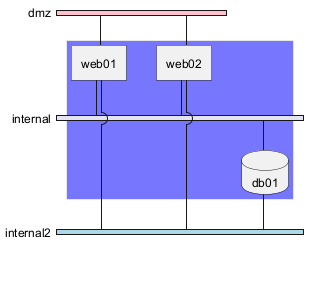
You can use same nodes on different networks (more than two networks);
nwdiag use in this case
'jump line' over networks.
|
🎉 Copied!
|
@startnwdiag
nwdiag {
// define group at outside network definitions
group {
color = "#7777FF";
web01;
web02;
db01;
}
network dmz {
color = "pink"
web01;
web02;
}
network internal {
web01;
web02;
db01 [shape = database ];
}
network internal2 {
color = "LightBlue";
web01;
web02;
db01;
}
}
@endnwdiag
|
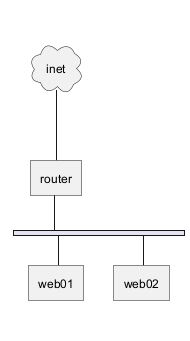
Peer networks are simple connections between two nodes, for which we don't use a horizontal "busbar" network
|
🎉 Copied!
|
@startnwdiag
nwdiag {
inet [shape = cloud];
inet -- router;
network {
router;
web01;
web02;
}
}
@endnwdiag
|
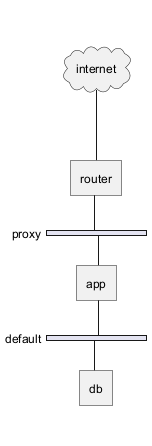
Without group
|
🎉 Copied!
|
@startnwdiag
nwdiag {
internet [ shape = cloud];
internet -- router;
network proxy {
router;
app;
}
network default {
app;
db;
}
}
@endnwdiag
|
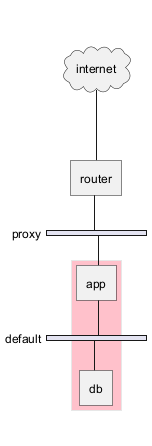
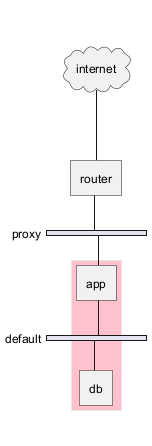
Group on first
|
🎉 Copied!
|
@startnwdiag
nwdiag {
internet [ shape = cloud];
internet -- router;
group {
color = "pink";
app;
db;
}
network proxy {
router;
app;
}
network default {
app;
db;
}
}
@endnwdiag
|
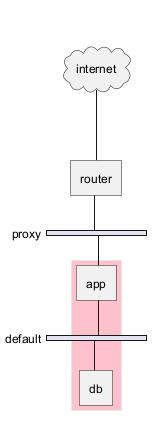
Group on second
|
🎉 Copied!
|
@startnwdiag
nwdiag {
internet [ shape = cloud];
internet -- router;
network proxy {
router;
app;
}
group {
color = "pink";
app;
db;
}
network default {
app;
db;
}
}
@endnwdiag
|
Group on third
|
🎉 Copied!
|
@startnwdiag
nwdiag {
internet [ shape = cloud];
internet -- router;
network proxy {
router;
app;
}
network default {
app;
db;
}
group {
color = "pink";
app;
db;
}
}
@endnwdiag
|
[Ref. Issue#408 and QA-12655]
|
🎉 Copied!
|
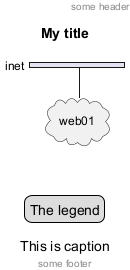
@startnwdiag
header some header
footer some footer
title My title
nwdiag {
network inet {
web01 [shape = cloud]
}
}
legend
The legend
end legend
caption This is caption
@endnwdiag
|
[Ref. QA-11303 and Common commands]
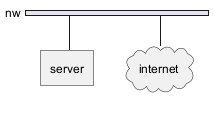
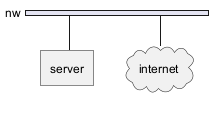
With shadow (by default)
|
🎉 Copied!
|
@startnwdiag
nwdiag {
network nw {
server;
internet;
}
internet [shape = cloud];
}
@endnwdiag
|
Without shadow
|
🎉 Copied!
|
@startnwdiag
<style>
root {
shadowing 0
}
</style>
nwdiag {
network nw {
server;
internet;
}
internet [shape = cloud];
}
@endnwdiag
|
[Ref. QA-14516]
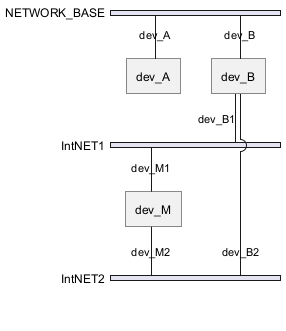
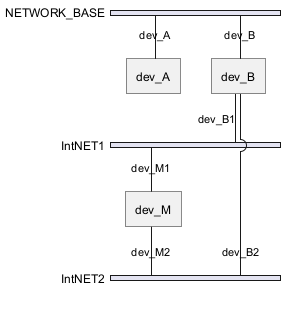
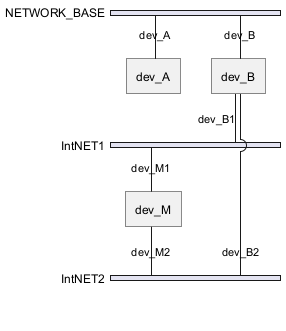
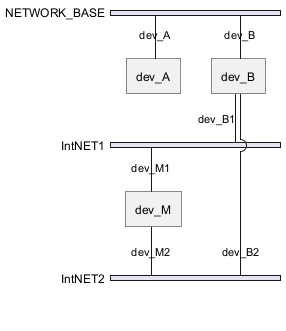
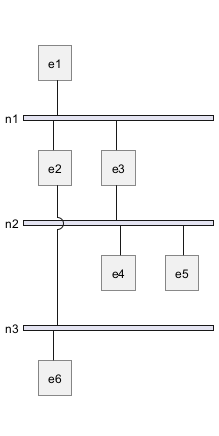
You can change the width of the networks, especially in order to have the same full width for only some or all networks.
Here are some examples, with all the possibilities.
First example
|
🎉 Copied!
|
@startnwdiag
nwdiag {
network NETWORK_BASE {
dev_A [address = "dev_A" ]
dev_B [address = "dev_B" ]
}
network IntNET1 {
dev_B [address = "dev_B1" ]
dev_M [address = "dev_M1" ]
}
network IntNET2 {
dev_B [address = "dev_B2" ]
dev_M [address = "dev_M2" ]
}
}
@endnwdiag
|
|
🎉 Copied!
|
@startnwdiag
nwdiag {
network NETWORK_BASE {
width = full
dev_A [address = "dev_A" ]
dev_B [address = "dev_B" ]
}
network IntNET1 {
dev_B [address = "dev_B1" ]
dev_M [address = "dev_M1" ]
}
network IntNET2 {
dev_B [address = "dev_B2" ]
dev_M [address = "dev_M2" ]
}
}
@endnwdiag
|
|
🎉 Copied!
|
@startnwdiag
nwdiag {
network NETWORK_BASE {
width = full
dev_A [address = "dev_A" ]
dev_B [address = "dev_B" ]
}
network IntNET1 {
width = full
dev_B [address = "dev_B1" ]
dev_M [address = "dev_M1" ]
}
network IntNET2 {
dev_B [address = "dev_B2" ]
dev_M [address = "dev_M2" ]
}
}
@endnwdiag
|
- all the network (with same full width)
|
🎉 Copied!
|
@startnwdiag
nwdiag {
network NETWORK_BASE {
width = full
dev_A [address = "dev_A" ]
dev_B [address = "dev_B" ]
}
network IntNET1 {
width = full
dev_B [address = "dev_B1" ]
dev_M [address = "dev_M1" ]
}
network IntNET2 {
width = full
dev_B [address = "dev_B2" ]
dev_M [address = "dev_M2" ]
}
}
@endnwdiag
|
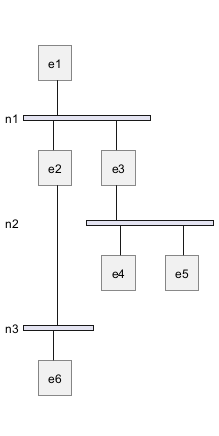
Second example
|
🎉 Copied!
|
@startnwdiag
nwdiag {
e1
network n1 {
e1
e2
e3
}
network n2 {
e3
e4
e5
}
network n3 {
e2
e6
}
}
@endnwdiag
|
|
🎉 Copied!
|
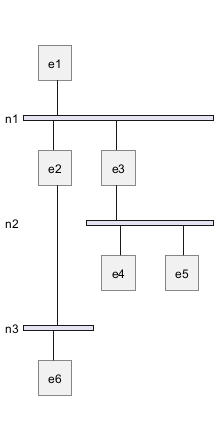
@startnwdiag
nwdiag {
e1
network n1 {
width = full
e1
e2
e3
}
network n2 {
e3
e4
e5
}
network n3 {
e2
e6
}
}
@endnwdiag
|
|
🎉 Copied!
|
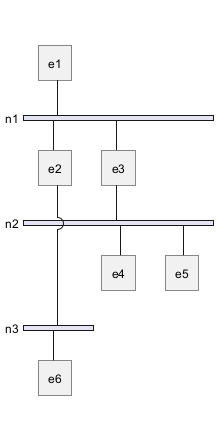
@startnwdiag
nwdiag {
e1
network n1 {
width = full
e1
e2
e3
}
network n2 {
width = full
e3
e4
e5
}
network n3 {
e2
e6
}
}
@endnwdiag
|
- all the network (with same full width)
|
🎉 Copied!
|
@startnwdiag
nwdiag {
e1
network n1 {
width = full
e1
e2
e3
}
network n2 {
width = full
e3
e4
e5
}
network n3 {
width = full
e2
e6
}
}
@endnwdiag
|
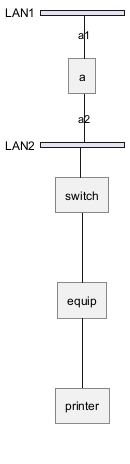
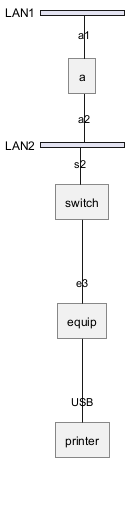
You can define other internal networks (TCP/IP, USB, SERIAL,...).
|
🎉 Copied!
|
@startnwdiag
nwdiag {
network LAN1 {
a [address = "a1"];
}
network LAN2 {
a [address = "a2"];
switch;
}
switch -- equip;
equip -- printer;
}
@endnwdiag
|
|
🎉 Copied!
|
@startnwdiag
nwdiag {
network LAN1 {
a [address = "a1"];
}
network LAN2 {
a [address = "a2"];
switch [address = "s2"];
}
switch -- equip;
equip [address = "e3"];
equip -- printer;
printer [address = "USB"];
}
@endnwdiag
|
[Ref. QA-12824]
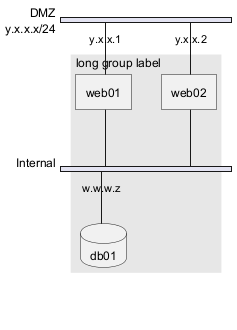
Without style (by default)
|
🎉 Copied!
|
@startnwdiag
nwdiag {
network DMZ {
address = "y.x.x.x/24"
web01 [address = "y.x.x.1"];
web02 [address = "y.x.x.2"];
}
network Internal {
web01;
web02;
db01 [address = "w.w.w.z", shape = database];
}
group {
description = "long group label";
web01;
web02;
db01;
}
}
@endnwdiag
|
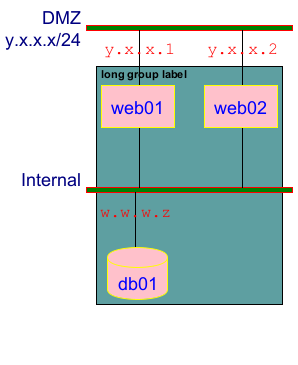
With style
You can use
style to change rendering of elements.
|
🎉 Copied!
|
@startnwdiag
<style>
nwdiagDiagram {
network {
BackGroundColor green
LineColor red
LineThickness 1.0
FontSize 18
FontColor navy
}
server {
BackGroundColor pink
LineColor yellow
LineThickness 1.0
' FontXXX only for description or label
FontSize 18
FontColor #blue
}
arrow {
' FontXXX only for address
FontSize 17
FontColor #red
FontName Monospaced
LineColor black
}
group {
BackGroundColor cadetblue
LineColor black
LineThickness 2.0
FontSize 11
FontStyle bold
Margin 5
Padding 5
}
}
</style>
nwdiag {
network DMZ {
address = "y.x.x.x/24"
web01 [address = "y.x.x.1"];
web02 [address = "y.x.x.2"];
}
network Internal {
web01;
web02;
db01 [address = "w.w.w.z", shape = database];
}
group {
description = "long group label";
web01;
web02;
db01;
}
}
@endnwdiag
|
[Ref. QA-14479]
|
🎉 Copied!
|
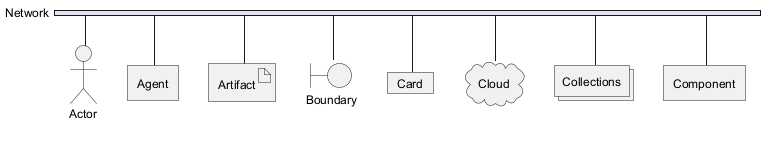
@startnwdiag
nwdiag {
network Network {
Actor [shape = actor]
Agent [shape = agent]
Artifact [shape = artifact]
Boundary [shape = boundary]
Card [shape = card]
Cloud [shape = cloud]
Collections [shape = collections]
Component [shape = component]
}
}
@endnwdiag
|
|
🎉 Copied!
|
@startnwdiag
nwdiag {
network Network {
Control [shape = control]
Database [shape = database]
Entity [shape = entity]
File [shape = file]
Folder [shape = folder]
Frame [shape = frame]
Hexagon [shape = hexagon]
Interface [shape = interface]
}
}
@endnwdiag
|
|
🎉 Copied!
|
@startnwdiag
nwdiag {
network Network {
Label [shape = label]
Node [shape = node]
Package [shape = package]
Person [shape = person]
Queue [shape = queue]
Stack [shape = stack]
Rectangle [shape = rectangle]
Storage [shape = storage]
Usecase [shape = usecase]
}
}
@endnwdiag
|
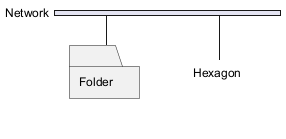
FIXME
- Overlap of label for folder
- Hexagon shape is missing
|
🎉 Copied!
|
@startnwdiag
nwdiag {
network Network {
Folder [shape = folder]
Hexagon [shape = hexagon]
}
}
@endnwdiag
|
|
🎉 Copied!
|
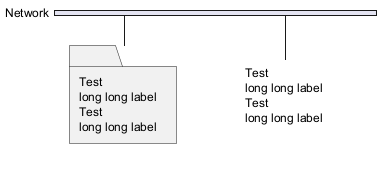
@startnwdiag
nwdiag {
network Network {
Folder [shape = folder, description = "Test, long long label\nTest, long long label"]
Hexagon [shape = hexagon, description = "Test, long long label\nTest, long long label"]
}
}
@endnwdiag
|
FIXME