





New! Render PlantUML diagrams directly inside GitHub
with our official browser extension —
No server. No tokens. No tracking. Zero permissions but clipboard. —
Try it out and let us know what you think!
How and where diagrams can be written
 Edit in Dokuwiki
 Edit in Asciidoc
 Edit in Markdown
@startuml
then ends with the keyword @enduml or (@startXYZ and @endXYZ, depending of the kind of diagram).
You can refer to the PlantUML Language Reference Guide.
Those descriptions may be included into:
- PlantUML file (.pu or .puml)
- Text files (.txt),
- HTML files (.html or .htm),
- Java sources files (.java),
- C/C++ source files (.c, .h, .cpp, .hpp or .hh)
- LaTeX sources files (.tex),
- APT files (.apt)
- Word files (.doc)
- URL
 File naming
By default, the output file (eg .png, .svg) has the same name as the source file used to generate it (only the extension changes).
If a source file contains several instances of @startXXX then an automatic sequence number is added to the output file names.
It is also possible to specify specific output filenames per diagram. For example:
@startuml image
Alice->Bob: Authentication Request
Bob-->Alice: Authentication Response
@enduml
In this example, the output file will be named
image.png for output format -tpng (which is the default). You can also specify an extension, but it will be ignored if it doesn't match the output format.
(Please note that you should not use this feature with Word integration.)
Include with identifier [include]
You can declare some part of a file with an identifier (id=<identifier>), as:
Example with a file named file.pu:
@startuml(id=TAG1)
Alice->Bob : TAG1
@enduml

@startuml(id=TAG2)
Alice->Bob : TAG2
@enduml
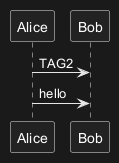
Then you can include, on one another file, one
id part with !include <filemane>!<id> command:
@startuml
!include file.pu!TAG2
Alice->Bob : hello
@enduml
The corresponding generated output will be:
Include with definition identifier (on the same file) [includedef]
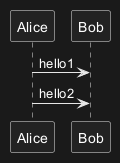
You can declare definition (def) some part on a file with an identifier between the tags @startdef(id=<identifier>) and @enddef.
Then you can include, on the same file, only one definition part with !includedef <identifier> command.
Example on a file named file.pu:

file_001.png, as:
Adding options for other tools
You can add options, for other tools, enclosed by { and }.
Only the first (<filename>) is relevant for PlantUML, the others are just skipped, and can be use by other tools.
@startuml{filename.png, This is my other caption text, width=16cm, option_for_other_tools=value}

@enduml
[Ref. QA-1466]
Adding output format when using pipe mode
⚠ Restriction: Only available when using pipe mode.
To specify the output format (PNG, SVG, ATXT or UTXT), on pipe mode, you can add this command on the input:
@@@format png
or
@@@format svg
or
@@@format UTXT
[Ref. QA-10808, GH-1810]
Поместите директивы PlantUML в исходный код программы [@pause, @unpause и @append ]
Вы можете поместить директивы ===== PlantUML ===== в комментарии исходного кода программы, используя ключевое слово:
@pause@unpause@append
/// My FSM looks like this:
/// @startuml myfsm
/// title My Finite-state machine
/// @pause

enum {
   // @append state AA
   STATE_AA,
   // @append state BB
   STATE_BB,
};

struct fsm my_fsm = {
    // @append [*] -> AA: Event 1
    { STATE_ENRTY, EVENT_1, STATE_AA },

    // @append AA -> BB: Event 3
    { STATE_AA, EVENT_3, STATE_BB },

    // and so on with a bunch of transitions...
};
/// @unpause
/// @enduml
Вот соответствующая диаграмма, сгенерированная на основе предыдущего ввода:

[Ref. QA-1525, QA-5793]