




New! Render PlantUML diagrams directly inside GitHub
with our official browser extension —
No server. No tokens. No tracking. Zero permissions but clipboard. —
Try it out and let us know what you think!
Style (or CSS like style)
 Edit in Dokuwiki
 Edit in Asciidoc
 Edit in Markdown
style was introduced in version 1.2019.9, and now it is the preferred way to style diagrams
- For old PlantUML versions, you have to use
skinparam useBetaStyle true. - For new PlantUML versions,
styleis enabled by default.
Skinparam is being phased out (see comments in issue#1464) and users should migrate to style.
Nevertheless, all existing legacy diagrams should still work with future versions of PlantUML.
There are some working examples on this page.
 Problem to solve
skinparam can change the rendering of diagrams (fonts, colors...):
- skinparams allow global changes for a whole diagram
- you can use
<<stereotype>>to define specific settings for groups of elements with the same stereotype - you can use creole syntax to individually change some setting
- every kind of diagram (sequence, class, activity) has its own skinparams
- there is an explosion of possible skinparams (see plantuml-skinparam for an attempt to grok them)
- some elements cannot be stereotyped (for example, messages in sequence diagrams)
style has the following features:
- The possibility to use individual change everywhere (so probably with creole engine which will be kept).
- The possibility to change a setting (for example default font size, color, name...) for all diagrams without separate settings for Sequence, Class, Activity, etc.
- At the same time, the possibility to change a setting for a specific diagram type (only Sequence for example).
- Having a syntax close to CSS
- No more hardcoded values (size, color...) in the core PlantUML library. Those values are stored in one single
plantuml.skinfile that people can read and modify. - Keep it simple: since nobody is reading the documentation (which is often out-of-date anyway), people should understand the style system just by reading examples.
- Avoid combinatorial explosion in style naming.
Properties that can be styled
The following properties can be set in style:
- FontName
- FontColor
- FontSize
- FontStyle
- BackGroundColor
- HyperLinkColor
- LineColor (old
BorderColor) : seems more generic - LineThickness
- LineStyle (old
BorderStyle): on real number or two real numbers separated with- - Padding
- Margin
- RoundCorner
- DiagonalCorner
- ExportedName : used for some format (SVG), not implemented
- Image : not implemented
- ImagePosition : not implemented
- MinimumWidth : not implemented
- WordWrap (to be renamed as MaximumWidth) (add carriage return if needed)
- HorizontalAlignment : left, right or center
- ...
Current Working Model
The current model has moved to work similarly to CSS, using a model of scoping and cascading styles to either element types or user-assigned styles (via <<stereotype>> notation).
Style can be inlined using <style> and </style> separators.
It is also possible to store style definition in some external file and to reference it using <style file=MyOwnFile.css>.
Basic styling for elements
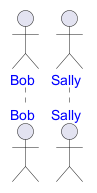
Basic example of a Sequence Diagram style
Basic example of a Work Breakdown Structure style
Let's at a different example, that of a Work Breakdown Structure: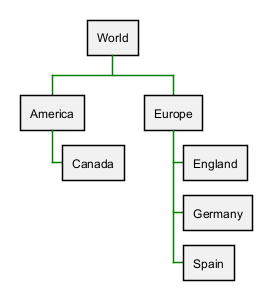
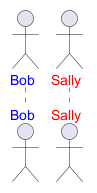
Adding user defined style targets (stereotype)
We can extend these examples to start targeting not just element types, but specific elements.
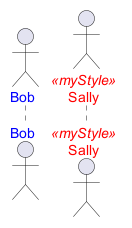
Using user defined styles in a Sequence Diagram
With shown stereotype
With not shown stereotype
Using Dynamic Selectors
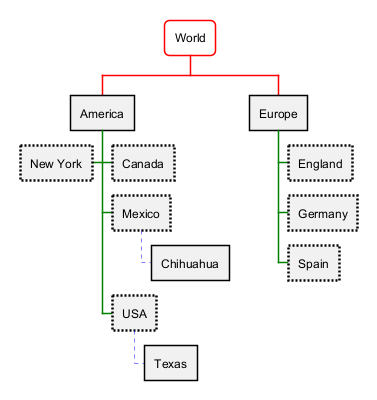
NOTE: This section is still very experimental and may change!As we are following the CSS model now, then it should be possible to use selectors to simplify targeting groups of elements, like those "children" (or "downstream") of a given element in diagrams like Work Breakdown or MindMaps.
Using the depth selector in a WBS
Using the "descendant" pseudo selector
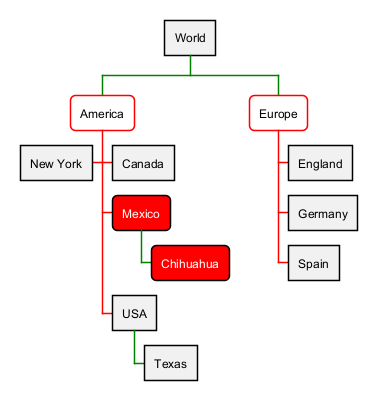
Of course, sometimes you want to target all "child" (or "downstream") elements of a given element. The* selector works as in CSS, to say: "this element, and all elements of any type that is it's child".
An example:
Using an external style file
NOTE: This is still a work in progress, and may not work as expected.If a file named
plantuml.skin is found in the same folder as the diagram, it will attempt to be loaded and used during diagram creation. This lays the groundwork--along with scoping styles to specific diagrams, and user defined styles--for creating truly complex and persistent styles, without including them in each of your diagrams.
Getting debug output
NOTE: This is still a work in progress, and may not show every element in every diagram.You can use the
-v (or -verbose) command line argument to get some debug output to help you determine what elements are in use, so you can target them.
java -jar plantuml.jar -v -tpng diagram.pu
results in:
(0.378 - 256 Mo) 238 Mo - Using style node.depth(0).root.wbsdiagram.rootnode.element
(0.546 - 256 Mo) 237 Mo - Using style depth(2).node.root.wbsdiagram.leafnode.element
(0.547 - 256 Mo) 237 Mo - Using style depth(2).node.root.*.wbsdiagram.element
(0.560 - 256 Mo) 236 Mo - Using style node.root.depth(3).wbsdiagram.leafnode.element
(0.561 - 256 Mo) 236 Mo - Using style node.root.depth(3).*.wbsdiagram.mexicostyle.element
(0.562 - 256 Mo) 236 Mo - Using style node.root.depth(3).*.wbsdiagram.element
(0.565 - 256 Mo) 236 Mo - Using style depth(2).node.root.wbsdiagram.mexicostyle.element
(0.569 - 256 Mo) 235 Mo - Using style depth(2).node.root.wbsdiagram.element
(0.571 - 256 Mo) 235 Mo - Using style node.depth(1).root.wbsdiagram.element
(0.572 - 256 Mo) 235 Mo - Using style node.depth(1).root.*.wbsdiagram.element
(1.963 - 256 Mo) 250 Mo - Using style depth(0).arrow.root.wbsdiagram.element
(1.964 - 256 Mo) 250 Mo - Using style depth(1).arrow.root.wbsdiagram.element
(1.965 - 256 Mo) 250 Mo - Using style depth(2).arrow.root.wbsdiagram.element