액티비티 다이어그램

액티비티 다이어그램은 워크플로 또는 프로세스를 표현합니다. 각 단계, 그 순서, 그리고 분기와 병렬 경로를 기술하며, 업무 프로세스, 알고리즘, 시작에서 끝으로 흐르는 모든 것에 적합합니다.

PlantUML에서는 각 액티비티를 한 줄씩 작성하고, 화살표와 if, repeat, fork 같은 키워드로 제어 흐름을 표현합니다. 다이어그램은 자동으로 생성됩니다.

기존 다이어그램을 유지보수하는 경우, 이전 구문도 계속 지원되지만 새 다이어그램에는 더 이상 권장되지 않습니다.

모든 다이어그램 유형에서 사용 가능한 기능은 공통 명령어를 참조하세요.

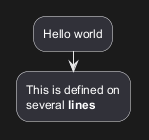
Simple action

Activities label starts with : and ends with ;.

Text formatting can be done using creole wiki syntax.

They are implicitly linked in their definition order.
🎉 Copied!

@startuml
:Hello world;
:This is defined on
several **lines**;
@enduml

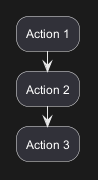
Other simple action (defined as a list)

Simple action list separated by -
🎉 Copied!

@startuml
- Action 1
- Action 2
- Action 3
@enduml

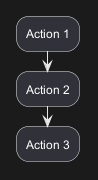
Simple action list separated by *

With one level
🎉 Copied!

@startuml
* Action 1
* Action 2
* Action 3
@enduml

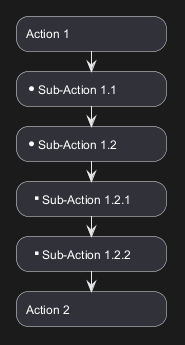
With several levels

🎉 Copied!

@startuml
<style>
element {MinimumWidth 150}
</style>
* Action 1
** Sub-Action 1.1
** Sub-Action 1.2
*** Sub-Action 1.2.1
*** Sub-Action 1.2.2
* Action 2
@enduml

[Ref. GH-2376]

Start/Stop/End

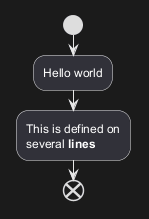
You can use start and stop keywords to denote the beginning and the end of a diagram.
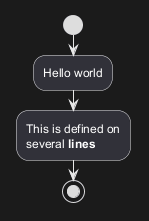
🎉 Copied!

@startuml
start
:Hello world;
:This is defined on
several **lines**;
stop
@enduml

You can also use the end keyword.

🎉 Copied!

@startuml
start
:Hello world;
:This is defined on
several **lines**;
end
@enduml

Conditional

You can use if, then and else keywords to put tests if your diagram. Labels can be provided using parentheses.
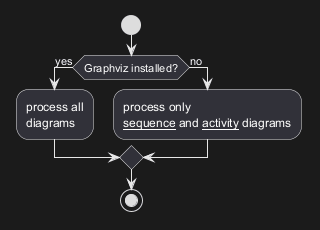
🎉 Copied!

@startuml

start

if (Graphviz installed?) then (yes)
  :process all\ndiagrams;
else (no)
  :process only
  __sequence__ and __activity__ diagrams;
endif

stop

@enduml

You can use the elseif keyword to have several tests :
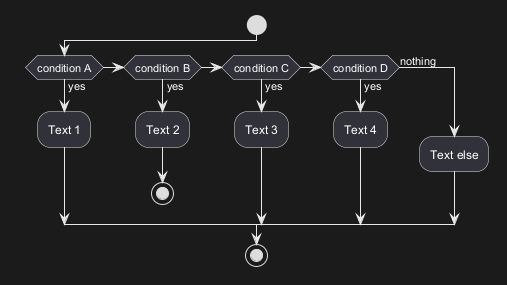
🎉 Copied!

@startuml
start
if (condition A) then (yes)
  :Text 1;
elseif (condition B) then (yes)
  :Text 2;
  stop
elseif (condition C) then (yes)
  :Text 3;
elseif (condition D) then (yes)
  :Text 4;
else (nothing)
  :Text else;
endif
stop
@enduml

*[Refs. [QA-3931](https:forum.plantuml.net/3931/please-provide-elseif-structure-vertically-activity-diagrams), [issue-582](https:github.com/plantuml/plantuml/issues/582)]*

*[Refs. [QA-3931](https:forum.plantuml.net/3931/please-provide-elseif-structure-vertically-activity-diagrams), [GH-582](https:github.com/plantuml/plantuml/issues/582)]*

WARNING
 This translation need to be updated. 
WARNING

Switch and case [switch, case, endswitch]

You can use switch, case and endswitch keywords to put switch in your diagram.

Labels can be provided using parentheses.
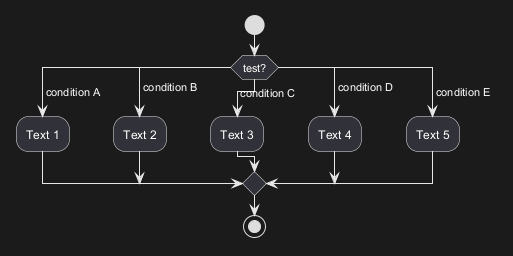
🎉 Copied!

@startuml
start
switch (test?)
case ( condition A )
  :Text 1;
case ( condition B ) 
  :Text 2;
case ( condition C )
  :Text 3;
case ( condition D )
  :Text 4;
case ( condition E )
  :Text 5;
endswitch
stop
@enduml

Conditional with stop on an action [kill, detach]

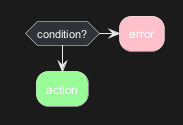
You can stop action on a if loop.
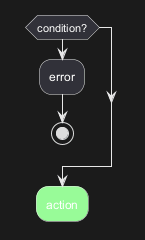
🎉 Copied!

@startuml
if (condition?) then
  :error;
  stop
endif
:action; <<#palegreen>>
@enduml

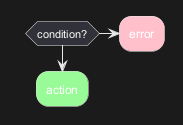
But if you want to stop at the precise action, you can use the kill or detach keyword:

🎉 Copied!

@startuml
if (condition?) then
  :error; <<#pink>>
  kill
endif
:action; <<#palegreen>>
@enduml

[Ref. QA-265]

🎉 Copied!

@startuml
if (condition?) then
  :error; <<#pink>>
  detach
endif
:action; <<#palegreen>>
@enduml

Repeat loop

Simple repeat loop

You can use repeat and repeat while keywords to have repeat loops.
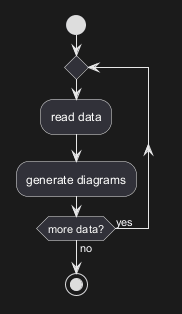
🎉 Copied!

@startuml

start

repeat
  :read data;
  :generate diagrams;
repeat while (more data?) is (yes) not (no)

stop

@enduml

Repeat loop with repeat action and backward action

It is also possible to use a full action as repeat target and insert an action in the return path using the backward keyword.
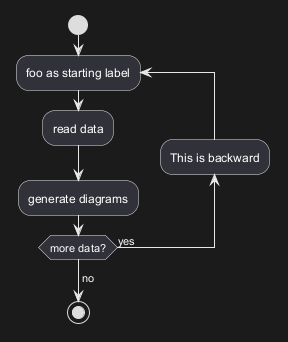
🎉 Copied!

@startuml

start

repeat :foo as starting label;
  :read data;
  :generate diagrams;
backward:This is backward;
repeat while (more data?) is (yes)
->no;

stop

@enduml

[Ref. QA-5826]

Break on a repeat loop [break]

You can use the break keyword after an action on a loop.
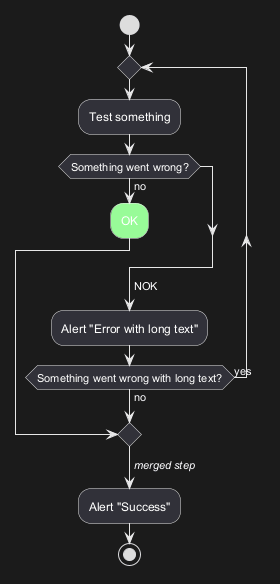
🎉 Copied!

@startuml
start
repeat
  :Test something;
    if (Something went wrong?) then (no)
      :OK; <<#palegreen>>
      break
    endif
    ->NOK;
    :Alert "Error with long text";
repeat while (Something went wrong with long text?) is (yes) not (no)
->//merged step//;
:Alert "Success";
stop
@enduml

[Ref. QA-6105]

Goto and Label Processing [label, goto]

⚠ It is currently only experimental 🚧

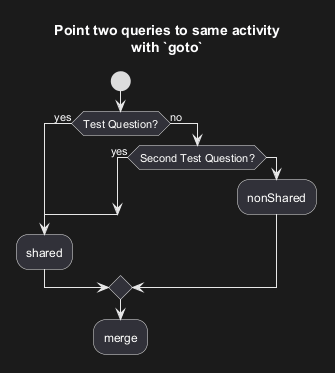
You can use label and goto keywords to denote goto processing, with:

🎉 Copied!

@startuml
title Point two queries to same activity\nwith `goto`
start
if (Test Question?) then (yes)
'space label only for alignment
label sp_lab0
label sp_lab1
'real label
label lab
:shared;
else (no)
if (Second Test Question?) then (yes)
label sp_lab2
goto sp_lab1
else
:nonShared;
endif
endif
:merge;
@enduml

[Ref. QA-15026, QA-12526 and initially QA-1626]

While loop

Simple while loop

You can use while and endwhile keywords to have while loop.
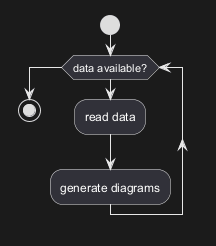
🎉 Copied!

@startuml

start

while (data available?)
  :read data;
  :generate diagrams;
endwhile

stop

@enduml

It is possible to provide a label after the endwhile keyword, or using the is keyword.
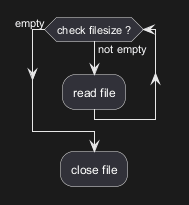
🎉 Copied!

@startuml
while (check filesize ?) is (not empty)
  :read file;
endwhile (empty)
:close file;
@enduml

While loop with backward action

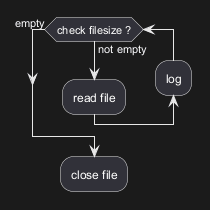
It is also possible to insert an action in the return path using the backward keyword.

🎉 Copied!

@startuml
while (check filesize ?) is (not empty)
  :read file;
  backward:log;
endwhile (empty)
:close file;
@enduml

[Ref. QA-11144]

Infinite while loop

If you are using detach to form an infinite while loop, then you will want to also hide the partial arrow that results using -[hidden]->
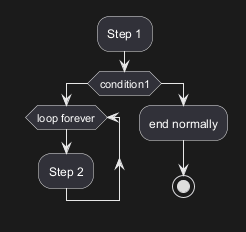
🎉 Copied!

@startuml
:Step 1;
if (condition1) then
  while (loop forever)
   :Step 2;
  endwhile
  -[hidden]->
  detach
else
  :end normally;
  stop
endif
@enduml

Parallel processing [fork, fork again, end fork, end merge]

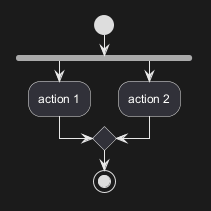
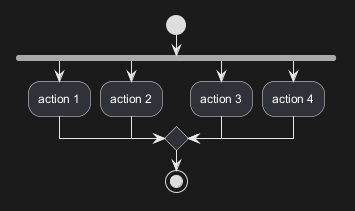
You can use fork, fork again and end fork or end merge keywords to denote parallel processing.

Simple fork
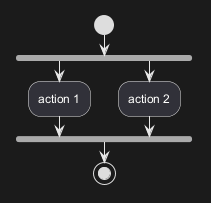
🎉 Copied!

@startuml
start
fork
  :action 1;
fork again
  :action 2;
end fork
stop
@enduml

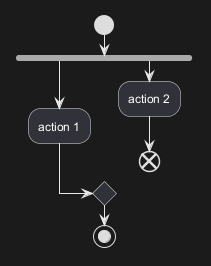
fork with end merge

🎉 Copied!

@startuml
start
fork
  :action 1;
fork again
  :action 2;
end merge
stop
@enduml

[Ref. QA-5320]

🎉 Copied!

@startuml
start
fork
  :action 1;
fork again
  :action 2;
fork again
  :action 3;
fork again
  :action 4;
end merge
stop
@enduml

🎉 Copied!

@startuml
start
fork
  :action 1;
fork again
  :action 2;
  end
end merge
stop
@enduml

[Ref. QA-13731]

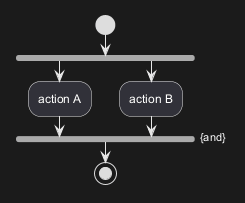
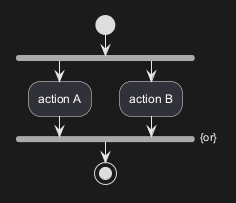
Label on end fork (or UML joinspec):
🎉 Copied!

@startuml
start
fork
  :action A;
fork again
  :action B;
end fork {or}
stop
@enduml

🎉 Copied!

@startuml
start
fork
  :action A;
fork again
  :action B;
end fork {and}
stop
@enduml

[Ref. QA-5346]

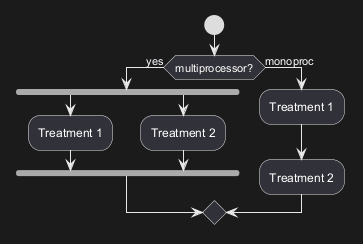
Other example

🎉 Copied!

@startuml

start

if (multiprocessor?) then (yes)
  fork
    :Treatment 1;
  fork again
    :Treatment 2;
  end fork
else (monoproc)
  :Treatment 1;
  :Treatment 2;
endif

@enduml

Split processing

Split

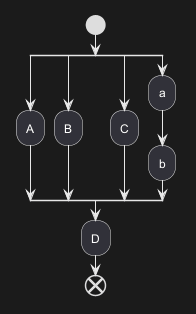
You can use split, split again and end split keywords to denote split processing.
🎉 Copied!

@startuml
start
split
   :A;
split again
   :B;
split again
   :C;
split again
   :a;
   :b;
end split
:D;
end
@enduml

Input split (multi-start)

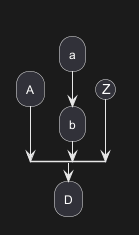
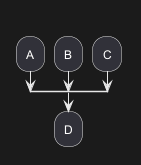
You can use hidden arrows to make an input split (multi-start):
🎉 Copied!

@startuml
split
   -[hidden]->
   :A;
split again
   -[hidden]->
   :B;
split again
   -[hidden]->
   :C;
end split
:D;
@enduml

🎉 Copied!

@startuml
split
   -[hidden]->
   :A;
split again
   -[hidden]->
   :a;
   :b;
split again
   -[hidden]->
   (Z)
end split
:D;
@enduml

[Ref. QA-8662]

Output split (multi-end)

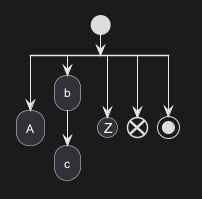
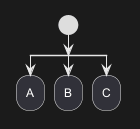
You can use kill or detach to make an output split (multi-end):
🎉 Copied!

@startuml
start
split
   :A;
   kill
split again
   :B;
   detach
split again
   :C;
   kill
end split
@enduml

🎉 Copied!

@startuml
start
split
   :A;
   kill
split again
   :b;
   :c;
   detach
split again
   (Z)
   detach
split again
   end
split again
   stop
end split
@enduml

Notes

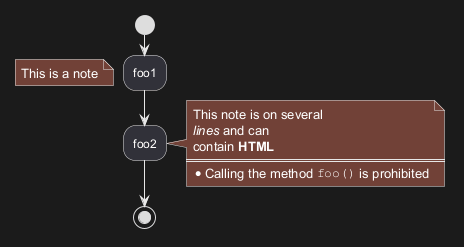
Text formatting can be done using creole wiki syntax.

A note can be floating, using floating keyword.
🎉 Copied!

@startuml

start
:foo1;
floating note left: This is a note
:foo2;
note right
  This note is on several
  //lines// and can
  contain <b>HTML</b>
  ====
  * Calling the method ""foo()"" is prohibited
end note
stop

@enduml

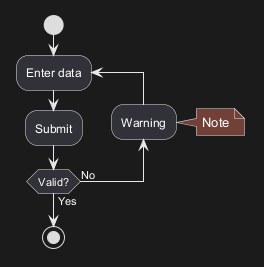
You can add note on backward activity:

🎉 Copied!

@startuml
start
repeat :Enter data;
:Submit;
backward :Warning;
note right: Note
repeat while (Valid?) is (No) not (Yes)
stop
@enduml

[Ref. QA-11788]

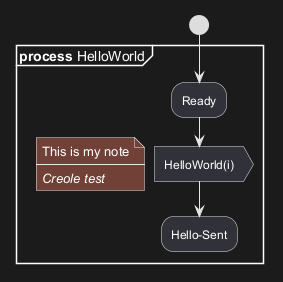
You can add note on partition activity:

🎉 Copied!

@startuml
start
partition "**process** HelloWorld" {
    note
        This is my note
        ----
        //Creole test//
    end note
    :Ready;
    :HelloWorld(i); <<output>>
    :Hello-Sent;
}
@enduml

[Ref. QA-2398]

Colors

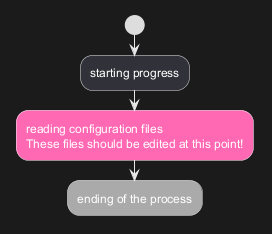
You can specify a color for some activities.
🎉 Copied!

@startuml

start
:starting progress;
:reading configuration files
These files should be edited at this point!; <<#HotPink>>
:ending of the process; <<#AAAAAA>>

@enduml

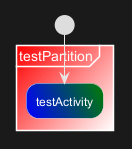
You can also use gradient color.

🎉 Copied!

@startuml
start
partition #red/white testPartition {
        :testActivity; <<#blue\green>>
}
@enduml

[Ref. QA-4906]

Lines without arrows

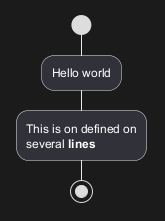
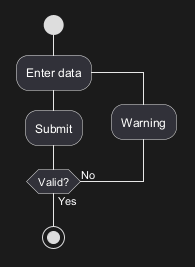
You can use skinparam ArrowHeadColor none in order to connect activities using lines only, without arrows.
🎉 Copied!

@startuml
skinparam ArrowHeadColor none
start
:Hello world;
:This is on defined on
several **lines**;
stop
@enduml

🎉 Copied!

@startuml
skinparam ArrowHeadColor none
start
repeat :Enter data;
:Submit;
backward :Warning;
repeat while (Valid?) is (No) not (Yes)
stop
@enduml

Arrows

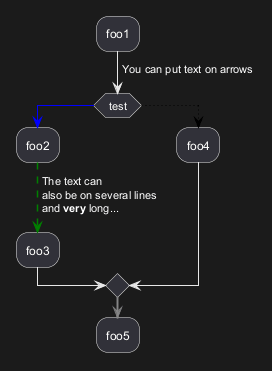
Using the -> notation, you can add texts to arrow, and change their color.

It's also possible to have dotted, dashed, bold or hidden arrows.
🎉 Copied!

@startuml
:foo1;
-> You can put text on arrows;
if (test) then
  -[#blue]->
  :foo2;
  -[#green,dashed]-> The text can
  also be on several lines
  and **very** long...;
  :foo3;
else
  -[#black,dotted]->
  :foo4;
endif
-[#gray,bold]->
:foo5;
@enduml

Simple colored arrow [link]

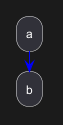
You can use simple colored arrow with the link keyword.
🎉 Copied!

@startuml
:a;
link #blue
:b;
@enduml

Multiple colored arrow

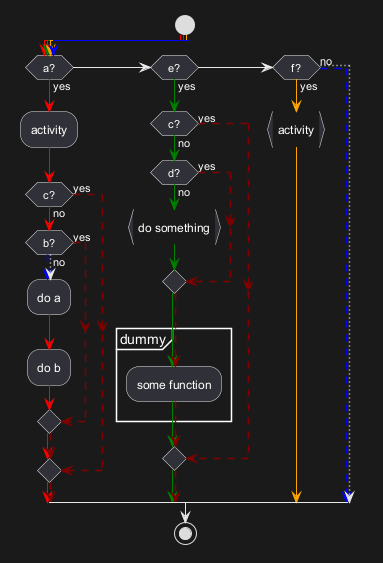
You can use multiple colored arrow.
🎉 Copied!

@startuml
skinparam colorArrowSeparationSpace 1
start
-[#red;#green;#orange;#blue]->
if(a?)then(yes)
-[#red]->
:activity;
-[#red]->
if(c?)then(yes)
-[#maroon,dashed]->
else(no)
-[#red]->
if(b?)then(yes)
-[#maroon,dashed]->
else(no)
-[#blue,dashed;dotted]->
:do a;
-[#red]->
:do b;
-[#red]->
endif
-[#red;#maroon,dashed]->
endif
-[#red;#maroon,dashed]->
elseif(e?)then(yes)
-[#green]->
if(c?)then(yes)
-[#maroon,dashed]->
else(no)
-[#green]->
if(d?)then(yes)
-[#maroon,dashed]->
else(no)
-[#green]->
:do something; <<continuous>>
-[#green]->
endif
-[#green;#maroon,dashed]->
partition dummy {
:some function;
}
-[#green;#maroon,dashed]->
endif
-[#green;#maroon,dashed]->

elseif(f?)then(yes)
-[#orange]->
:activity; <<continuous>>
-[#orange]->
else(no)
-[#blue,dashed;dotted]->
endif
stop
@enduml

[Ref. QA-4411]

Connector (or Circle)

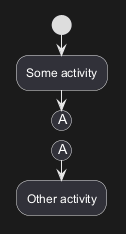
You can use parentheses to denote connector.
🎉 Copied!

@startuml
start
:Some activity;
(A)
detach
(A)
:Other activity;
@enduml

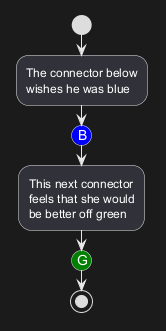
Color on connector

You can add color on connector.
🎉 Copied!

@startuml
start
:The connector below
wishes he was blue;
#blue:(B)
:This next connector
feels that she would
be better off green;
#green:(G)
stop
@enduml

[Ref. QA-10077]

And even use style on Circle:

🎉 Copied!

@startuml
<style>
circle {
  Backgroundcolor palegreen
  LineColor green
  LineThickness 2
}
</style>

(1)
:a;
(A)
@enduml

[Ref. QA-19975]

Grouping or partition

Group

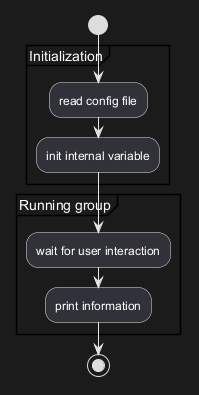
You can group activity together by defining group:
🎉 Copied!

@startuml
start
group Initialization {
    :read config file;
    :init internal variable;
}
group Running group {
    :wait for user interaction;
    :print information;
}

stop
@enduml

Partition

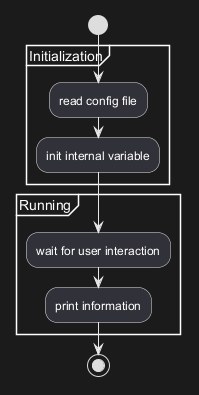
You can group activity together by defining partition:
🎉 Copied!

@startuml
start
partition Initialization {
    :read config file;
    :init internal variable;
}
partition Running {
    :wait for user interaction;
    :print information;
}

stop
@enduml

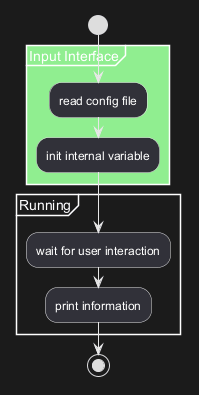
It's also possible to change partition color:

🎉 Copied!

@startuml
start
partition #lightGreen "Input Interface" {
    :read config file;
    :init internal variable;
}
partition Running {
    :wait for user interaction;
    :print information;
}
stop
@enduml

[Ref. QA-2793]

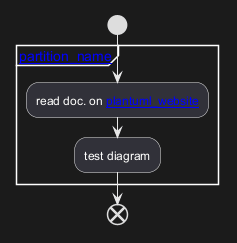
It's also possible to add link to partition:

🎉 Copied!

@startuml
start
partition "[[http://plantuml.com partition_name]]" {
    :read doc. on [[http://plantuml.com plantuml_website]];
    :test diagram;
}
end
@enduml

[Ref. QA-542]

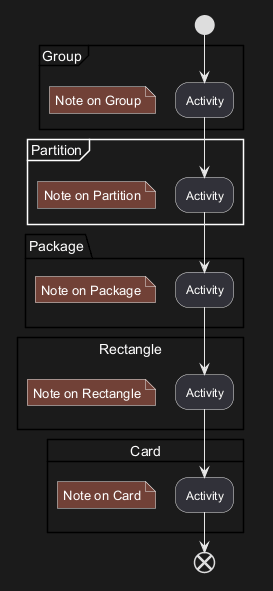
Group, Partition, Package, Rectangle or Card

You can group activity together by defining:

🎉 Copied!

@startuml
start
group Group {
  :Activity;
}
floating note: Note on Group

partition Partition {
  :Activity;
}
floating note: Note on Partition

package Package {
  :Activity;
}
floating note: Note on Package 

rectangle Rectangle {
  :Activity;
}
floating note: Note on Rectangle 

card Card {
  :Activity;
}
floating note: Note on Card
end
@enduml

Swimlanes

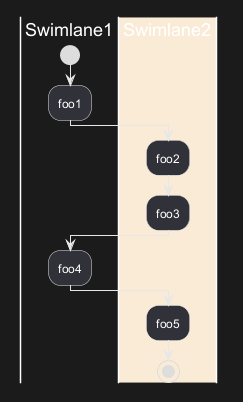
Using pipe |, you can define swimlanes.

It's also possible to change swimlanes color.
🎉 Copied!

@startuml
|Swimlane1|
start
:foo1;
|#AntiqueWhite|Swimlane2|
:foo2;
:foo3;
|Swimlane1|
:foo4;
|Swimlane2|
:foo5;
stop
@enduml

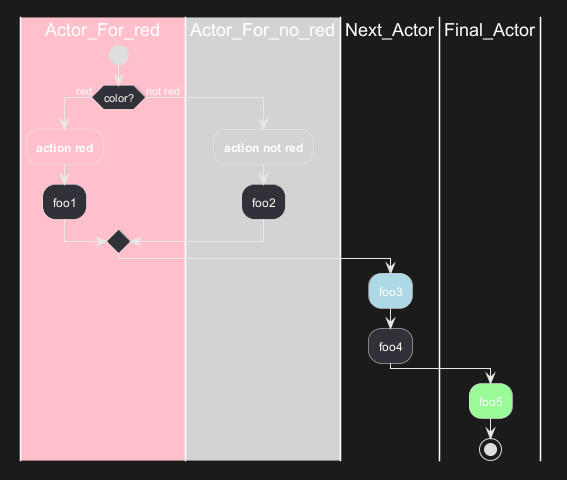
You can add if conditional or repeat or while loop within swimlanes.
🎉 Copied!

@startuml
|#pink|Actor_For_red|
start
if (color?) is (red) then
:**action red**; <<#pink>>
:foo1;
else (not red)
|#lightgray|Actor_For_no_red|
:**action not red**; <<#lightgray>>
:foo2;
endif
|Next_Actor|
:foo3; <<#lightblue>>
:foo4;
|Final_Actor|
:foo5; <<#palegreen>>
stop
@enduml

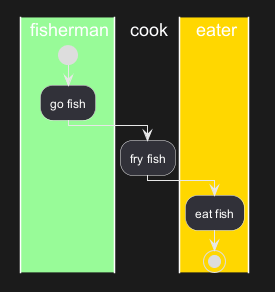
You can also use alias with swimlanes, with this syntax:

🎉 Copied!

@startuml
|#palegreen|f| fisherman
|c| cook
|#gold|e| eater
|f|
start
:go fish;
|c|
:fry fish;
|e|
:eat fish;
stop
@enduml

[Ref. QA-2681]

Detach or kill [detach, kill]

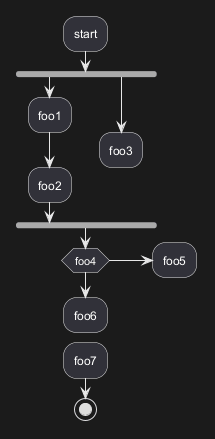
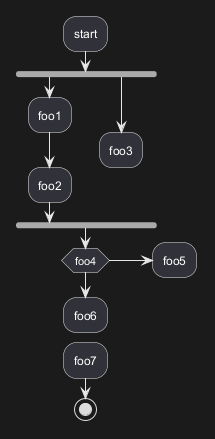
It's possible to remove an arrow using the detach or kill keyword:

🎉 Copied!

@startuml
 :start;
 fork
   :foo1;
   :foo2;
 fork again
   :foo3;
   detach
 endfork
 if (foo4) then
   :foo5;
   detach
 endif
 :foo6;
 detach
 :foo7;
 stop
@enduml

🎉 Copied!

@startuml
 :start;
 fork
   :foo1;
   :foo2;
 fork again
   :foo3;
   kill
 endfork
 if (foo4) then
   :foo5;
   kill
 endif
 :foo6;
 kill
 :foo7;
 stop
@enduml

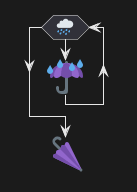
Emoji as action (with icon stereotype)

You can use emoji as action, with the stereotype <<icon>>:
🎉 Copied!

@startuml
while (<:cloud_with_rain:>)
  :<:umbrella:>; <<icon>>
endwhile
-<<icon>><:closed_umbrella:>
@enduml

[Ref. GH-2436]

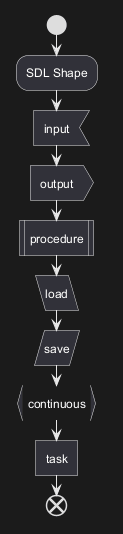
SDL (Specification and Description Language) (with SDL sterotype)

Table of SDL Shape Name

Name Stereotype syntax Deprecated syntax
Input <<input>> <
Output <<output>> >
Procedure <<procedure>> |
Load <<load>> \
Save <<save>> /
Continuous <<continuous>> }
Task <<task>> ]

[Ref. QA-11518, GH-1270]

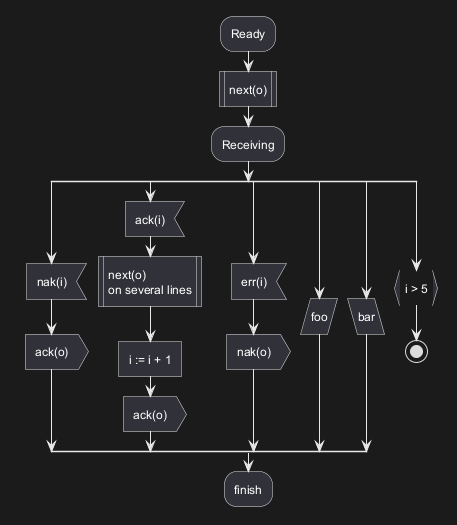
SDL using stereotype (Current official form)
🎉 Copied!

@startuml
start
:SDL Shape;
:input; <<input>>
:output; <<output>>
:procedure; <<procedure>>
:load; <<load>>
:save; <<save>>
:continuous; <<continuous>>
:task; <<task>>
end
@enduml

🎉 Copied!

@startuml
:Ready;
:next(o); <<procedure>>
:Receiving;
split
 :nak(i); <<input>>
 :ack(o); <<output>>
split again
 :ack(i); <<input>>
 :next(o)
 on several lines; <<procedure>>
 :i := i + 1; <<task>>
 :ack(o); <<output>>
split again
 :err(i); <<input>>
 :nak(o); <<output>>
split again
 :foo; <<save>>
split again
 :bar; <<load>>
split again
 :i > 5; <<continuous>>
stop
end split
:finish;
@enduml

UML (Unified Modeling Language) Shape (with UML stereotype)

Table of UML Shape Name

Name Stereotype syntax
ObjectNode <<object>>
ObjectNode
typed by signal
<<objectSignal>> or <<object-signal>>
AcceptEventAction
without TimeEvent trigger
<<acceptEvent>> or <<accept-event>>
AcceptEventAction
with TimeEvent trigger
<<timeEvent>> or <<time-event>>
SendSignalAction

SendObjectAction
with signal type
<<sendSignal>> or <<send-signal>>
Trigger <<trigger>>

[Ref. GH-2185]

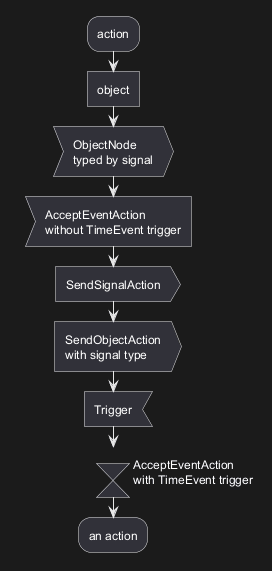
UML Shape Example using Stereotype

🎉 Copied!

@startuml
:action;
:object; <<object>>

:ObjectNode
typed by signal; <<objectSignal>>

:AcceptEventAction
without TimeEvent trigger; <<acceptEvent>>

:SendSignalAction; <<sendSignal>>

:SendObjectAction
with signal type; <<sendSignal>>

:Trigger; <<trigger>>

:\t\t\t\t\t\tAcceptEventAction
\t\t\t\t\t\twith TimeEvent trigger; <<timeEvent>>
:an action;
@enduml

[Ref. GH-2185, QA-16558, GH-1659]

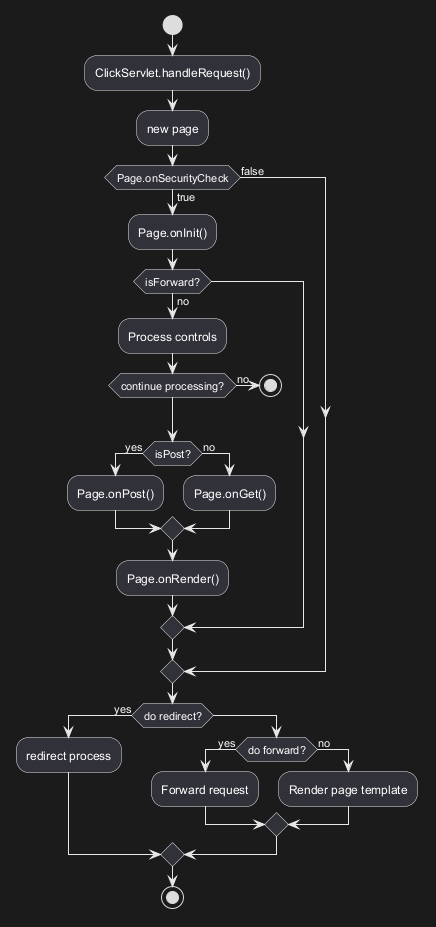
Complete example

🎉 Copied!

@startuml

start
:ClickServlet.handleRequest();
:new page;
if (Page.onSecurityCheck) then (true)
  :Page.onInit();
  if (isForward?) then (no)
    :Process controls;
    if (continue processing?) then (no)
      stop
    endif

    if (isPost?) then (yes)
      :Page.onPost();
    else (no)
      :Page.onGet();
    endif
    :Page.onRender();
  endif
else (false)
endif

if (do redirect?) then (yes)
  :redirect process;
else
  if (do forward?) then (yes)
    :Forward request;
  else (no)
    :Render page template;
  endif
endif

stop

@enduml

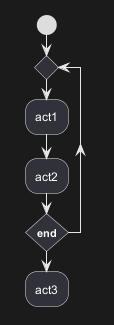
Condition Style

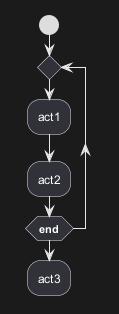
Inside style (by default)
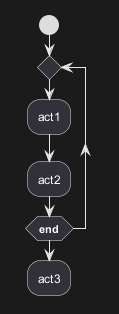
🎉 Copied!

@startuml
skinparam conditionStyle inside
start
repeat
  :act1;
  :act2;
repeatwhile (<b>end)
:act3;
@enduml

🎉 Copied!

@startuml
start
repeat
  :act1;
  :act2;
repeatwhile (<b>end)
:act3;
@enduml

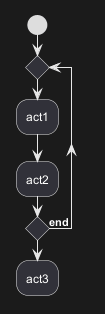
Diamond style

🎉 Copied!

@startuml
skinparam conditionStyle diamond
start
repeat
  :act1;
  :act2;
repeatwhile (<b>end)
:act3;
@enduml

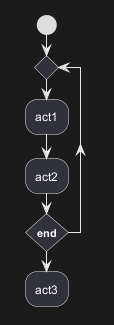
InsideDiamond (or Foo1) style

🎉 Copied!

@startuml
skinparam conditionStyle InsideDiamond
start
repeat
  :act1;
  :act2;
repeatwhile (<b>end)
:act3;
@enduml

🎉 Copied!

@startuml
skinparam conditionStyle foo1
start
repeat
  :act1;
  :act2;
repeatwhile (<b>end)
:act3;
@enduml

[Ref. QA-1290 and #400]

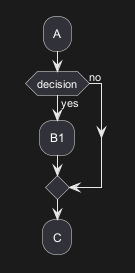
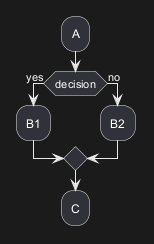
Condition End Style

Diamond style (by default)

🎉 Copied!

@startuml
skinparam ConditionEndStyle diamond
:A;
if (decision) then (yes)
    :B1;
else (no)
endif
:C;
@enduml

🎉 Copied!

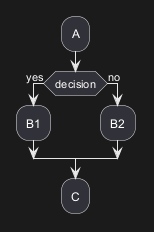
@startuml
skinparam ConditionEndStyle diamond
:A;
if (decision) then (yes)
    :B1;
else (no)
    :B2;
endif
:C;
@enduml
@enduml

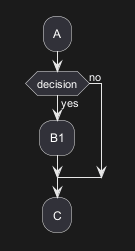
Horizontal line (hline) style

🎉 Copied!

@startuml
skinparam ConditionEndStyle hline
:A;
if (decision) then (yes)
    :B1;
else (no)
endif
:C;
@enduml

🎉 Copied!

@startuml
skinparam ConditionEndStyle hline
:A;
if (decision) then (yes)
    :B1;
else (no)
    :B2;
endif
:C;
@enduml
@enduml

[Ref. QA-4015]

Using (global) style

Without style (by default)
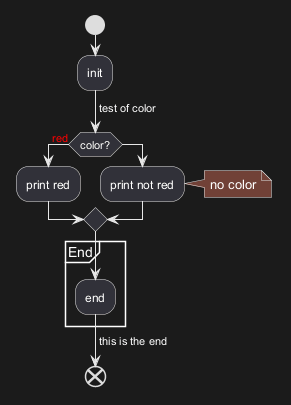
🎉 Copied!

@startuml
start
:init;
-> test of color;
if (color?) is (<color:red>red) then
:print red;
else 
:print not red;
note right: no color
endif
partition End {
:end;
}
-> this is the end;
end
@enduml

With style

You can use style to change rendering of elements.
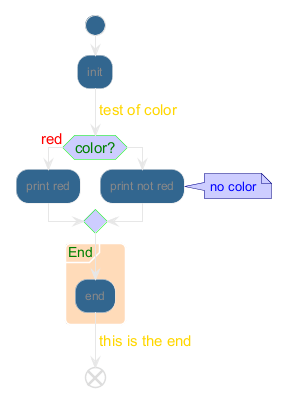
🎉 Copied!

@startuml
<style>
activityDiagram {
  BackgroundColor #33668E
  BorderColor #33668E
  FontColor #888
  FontName arial

  diamond {
    BackgroundColor #ccf
    LineColor #00FF00
    FontColor green
    FontName arial
    FontSize 15
  }
  arrow {
    FontColor gold
    FontName arial
    FontSize 15
  }
  partition {
    LineColor red
    FontColor green
    RoundCorner 10
    BackgroundColor PeachPuff
  }
  note {
    FontColor Blue
    LineColor Navy
    BackgroundColor #ccf
  }
}
document {
   BackgroundColor transparent
}
</style>
start
:init;
-> test of color;
if (color?) is (<color:red>red) then
:print red;
else 
:print not red;
note right: no color
endif
partition End {
:end;
}
-> this is the end;
end
@enduml

Creole on Activity

You can use Creole or HTML Creole on Activity diagram:
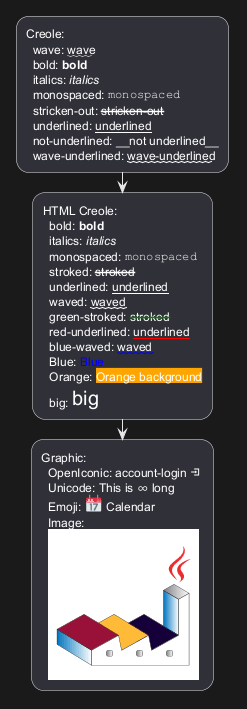
🎉 Copied!

@startuml
:Creole:
  wave: ~~wave~~
  bold: **bold**
  italics: //italics//
  monospaced: ""monospaced""
  stricken-out: --stricken-out--
  underlined: __underlined__
  not-underlined: ~__not underlined__
  wave-underlined: ~~wave-underlined~~;
:HTML Creole:
  bold: <b>bold
  italics: <i>italics
  monospaced: <font:monospaced>monospaced
  stroked: <s>stroked
  underlined: <u>underlined
  waved: <w>waved
  green-stroked: <s:green>stroked
  red-underlined: <u:red>underlined
  blue-waved: <w:#0000FF>waved
  Blue: <color:blue>Blue
  Orange: <back:orange>Orange background
  big: <size:20>big;
:Graphic:
  OpenIconic: account-login <&account-login> 
  Unicode: This is <U+221E> long
  Emoji: <:calendar:> Calendar
  Image:
  <img:https://plantuml.com/logo3.png>;
@enduml