





New! Render PlantUML diagrams directly inside GitHub
with our official browser extension —
No server. No tokens. No tracking. Zero permissions but clipboard. —
Try it out and let us know what you think!
URL authentication
 Edit in Dokuwiki
 Edit in Asciidoc
 Edit in Markdown
!include, !import or %load_json.
The authentication data is not stored in a DSL script, but in extra configuration files to which PlantUML must have access. The folder for the user data can be defined via a property.
Which authentication method with which user data should be performed for an endpoint is decided by a special notation in the URL. PlantUML interprets the UserInfo of the authority part of a URL as the name for the configuration.
Examples:
@startuml

!include https://access@raw.example.com/stash/repository/architecture/master/modelbase.puml

!$DATA = %load_json('https://service-cred@localhost/api/rest/endpoint?format=json)

' Embedded rendering of JSON structure

 rectangle Test #tan as "
    {{json
    $DATA
    }}
    Example JSON data
    "
' ...
@enduml
For the examples above, PlantUML needs two files (
access.credential and service-cred.credential) in the folder configured by the property plantuml.security.credentials.path. Both files are structured as JSON and must be encoded in UTF-8.
By default, PlantUML only allows authentication for https URLs, since the credentials must be transmitted in encrypted form. If logins should also be allowed to go to unencrypted connections, the plantuml.security.allowNonSSLAuth property must be set to true. This is not under any circumstances recommended for connections that access servers on the internet.
Actually, PlantUML supports three kinds of authentication: Basic Auth, OAuth2, and raw token authentication. For the OAuth2 the grant types client_credential and password are supported. With the raw token authentication, it's possible to pass throw a manually generated token (e.g. API key, bearer token) to the URL endpoint.
 Credentials configuration
A credentials configuration file must be stored in the folder configured by the property plantuml.security.credentials.path. The file extension is .credential, the file content is structured in JSON, the charset encoding is UTF-8, the filename must match the UserInfo part of the URL.
General JSON structure:
{
  "name": "<name of the configuration>",
  "type": "<type of the authentication method>",
  "identifier": "<client identifier>",
  "secret": "<client secret>",
  "properties": {
    "<key1>": "<value1>",
    "<key2>": "<value2>"
  },
  "proxy": {
    "type": "<proxy type>",
    "address": "<proxy server address>",
    "port": "<proxy server port>"
  }
}
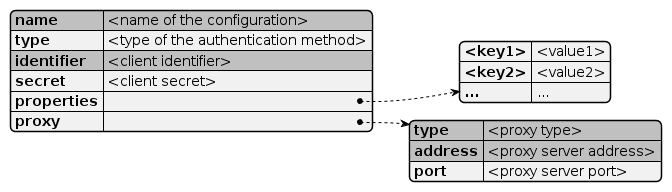
name: required- The name of the configuration and should be similar to the file name
type: (basicauth,oauth,tokenauth), default:basicauth- Type of the authentication method
identifier: required- Client identifier name (user name, client id, principal, app key, ...)
secret:- Secret for the identifier in clear text (not encrypted)
properties:- Optional authentication-method specific properties. Properties should be defined as key-value pairs. A value can itself be a set of key-value pairs.
proxy:- Optional proxy configuration (overrides system proxy settings)
proxy.type: required (direct,socks,http)- Proxy type definition.
proxy.address: required- Proxy server address (hostname, IP address)
proxy.port:- Proxy server port number
- The name of a configuration may only contain characters from the following set: [
a-z], [A-Z], [0-9], and "-". Not more than 64 characters are allowed.
Proxy configuration
A credential configuration can define a proxy configuration to override the system proxy configuration (e.g. via environment variables).
General Proxy structure:
{
  "type": "<proxy type>",
  "address": "<proxy server address>",
  "port": "<proxy server port>"
}

Any authentication configuration can define its own proxy definition. Three kinds of proxy types are allowed:
direct, socks and http.
direct- Represents a direct connection or the absence of a proxy.
socks- Represents a SOCKS (V4 or V5) proxy.
http- Represents proxy for high-level protocols such as HTTP or FTP.
direct an address and port are not required (and will be ignored).
address- Hostname or IP address of the proxy server
port- Port number of the proxy host.
"proxy": {
  "type": "socks",
  "address": "192.168.1.251",
  "port": "80"
}
"proxy": {
  "type": "direct"
}
"proxy": {
  "type": "http",
  "address": "proxy.example.com",
  "port": "8081"
}
Property configuration
Folder with credentials files
plantuml.security.credentials.path- Value: path to an existing folder with a read access for PlantUML
java -jar PlantUML.jar -Dplantuml.security.credentials.path=/opt/mycomp/plantuml/security/credentials/
See also Security configuration
Notes:
- The internal function
%getenvwill not expose the configuration value. - Any content in the configured path (and in all subfolders) are invisible for DSL model scripts. It is required that the configured folder is a separate location for the credentials files.
- Multiple paths will be ignored. PlantUML reads the credentials files only from the first configured folder.
plantuml.security.allowNonSSLAuth- Value: (
true|false)
java -jar PlantUML.jar -Dplantuml.security.allowNonSSLAuth=true
See also Security configuration