Diagrama de actividad

Un diagrama de actividad describe un flujo de trabajo o proceso: los pasos, el orden en que ocurren, así como las decisiones y los caminos paralelos que aparecen en el recorrido. Es adecuado para procesos de negocio, algoritmos y todo lo que fluye de un inicio a un fin.

En PlantUML, usted escribe cada actividad en su propia línea, usando flechas y palabras clave como if, repeat y fork para expresar el flujo de control. El diagrama se genera automáticamente.

Si usted mantiene diagramas antiguos, la sintaxis anterior sigue siendo compatible, pero ya no se recomienda para diagramas nuevos.

Consulte los comandos comunes para conocer las funcionalidades disponibles en todos los tipos de diagramas.

Una Actividad simple

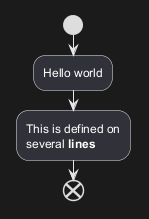
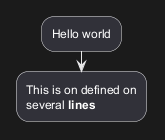
Las etiquetas de las actividades inician con un dos puntos (:) y terminan con un punto y coma (;).

Se puede aplicar formato a un texto usando sintaxis de WikiCreole.

Están implícitamente enlazados en el orden de su definición.
🎉 Copied!

@startuml
:Hello world;
:This is on defined on
several **lines**;
@enduml

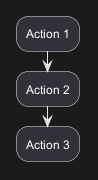
Other simple action (defined as a list)

Simple action list separated by -
🎉 Copied!

@startuml
- Action 1
- Action 2
- Action 3
@enduml

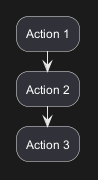
Simple action list separated by *

With one level
🎉 Copied!

@startuml
* Action 1
* Action 2
* Action 3
@enduml

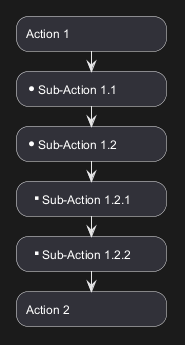
With several levels

🎉 Copied!

@startuml
<style>
element {MinimumWidth 150}
</style>
* Action 1
** Sub-Action 1.1
** Sub-Action 1.2
*** Sub-Action 1.2.1
*** Sub-Action 1.2.2
* Action 2
@enduml

[Ref. GH-2376]

Inicio/Parada/Fin

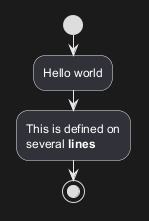
Puede utilizar las palabras clave start y stop para indicar el inicio y el final de un diagrama.
🎉 Copied!

@startuml
start
:Hello world;
:This is defined on
several **lines**;
stop
@enduml

También puede utilizar la palabra clave end.

🎉 Copied!

@startuml
start
:Hello world;
:This is defined on
several **lines**;
end
@enduml

Condicional

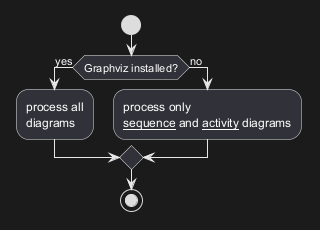
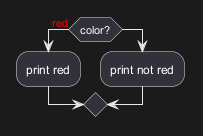
Puede utilizar las palabras clave if, then, else y endif para colocar pruebas en su diagrama. Las etiquetas pueden proporcionarse utilizando paréntesis.

Las 3 sintaxis son posibles:

🎉 Copied!

@startuml

start

if (Graphviz installed?) then (yes)
  :process all\ndiagrams;
else (no)
  :process only
  __sequence__ and __activity__ diagrams;
endif

stop

@enduml

🎉 Copied!

@startuml
if (color?) is (<color:red>red) then
:print red;
else 
:print not red;
endif
@enduml

🎉 Copied!

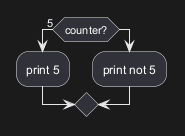
@startuml
if (counter?) equals (5) then
:print 5;
else 
:print not 5;
endif
@enduml

[Ref. QA-301]

Condicionales anidadas (modo horizontal)

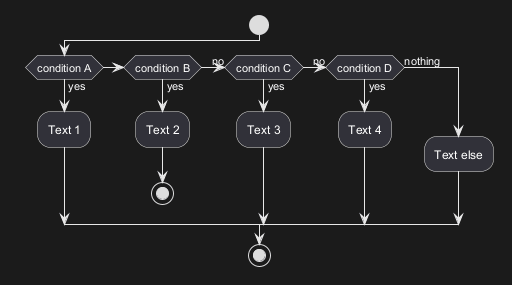
Puede utilizar la palabra clave elseif para tener varias condicionales anidadas (por defecto, es el modo horizontal):
🎉 Copied!

@startuml
start
if (condition A) then (yes)
  :Text 1;
elseif (condition B) then (yes)
  :Text 2;
  stop
(no) elseif (condition C) then (yes)
  :Text 3;
(no) elseif (condition D) then (yes)
  :Text 4;
else (nothing)
  :Text else;
endif
stop
@enduml

Condicionales anidadas (modo vertical)

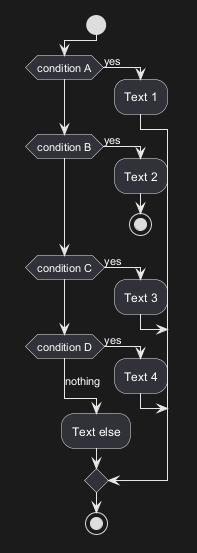
Puede utilizar el comando !pragma useVerticalIf on para tener las condicionales anidadas en modo vertical:
🎉 Copied!

@startuml
!pragma useVerticalIf on
start
if (condition A) then (yes)
  :Text 1;
elseif (condition B) then (yes)
  :Text 2;
  stop
elseif (condition C) then (yes)
  :Text 3;
elseif (condition D) then (yes)
  :Text 4;
else (nothing)
  :Text else;
endif
stop
@enduml

Puede utilizar la opción de línea de comandos -P para especificar el pragma:

java -jar plantuml.jar -PuseVerticalIf=on

[Refs. QA-3931, GH-582]

WARNING
 This translation need to be updated. 
WARNING

Switch case [switch, case, endswitch]

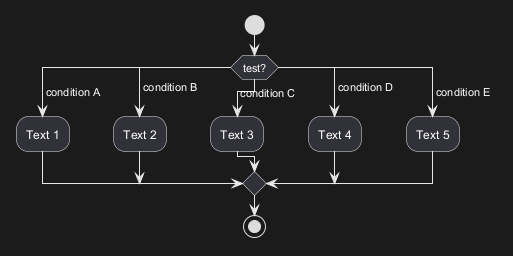
Puedes usar las palabras clave switch, case y endswitch para hacer un switch en tu diagrama.

Puedes colocar etiquetas usando paréntesis.
🎉 Copied!

@startuml
start
switch (test?)
case ( condition A )
  :Text 1;
case ( condition B ) 
  :Text 2;
case ( condition C )
  :Text 3;
case ( condition D )
  :Text 4;
case ( condition E )
  :Text 5;
endswitch
stop
@enduml

Conditional with stop on an action [kill, detach]

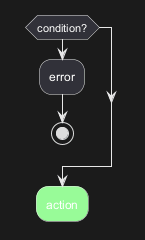
You can stop action on a if loop.
🎉 Copied!

@startuml
if (condition?) then
  :error;
  stop
endif
:action; <<#palegreen>>
@enduml

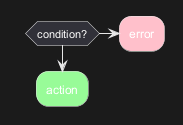
But if you want to stop at the precise action, you can use the kill or detach keyword:

🎉 Copied!

@startuml
if (condition?) then
  :error; <<#pink>>
  kill
endif
:action; <<#palegreen>>
@enduml

[Ref. QA-265]

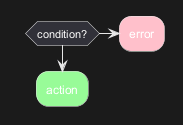
🎉 Copied!

@startuml
if (condition?) then
  :error; <<#pink>>
  detach
endif
:action; <<#palegreen>>
@enduml

El ciclo Repeat

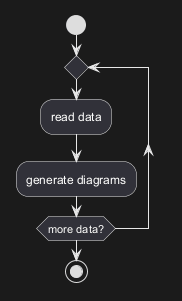
Puedes usar las palabras reservadas repeat y repeatwhile para colocar bucles.
🎉 Copied!

@startuml

start

repeat
  :read data;
  :generate diagrams;
repeat while (more data?)

stop

@enduml

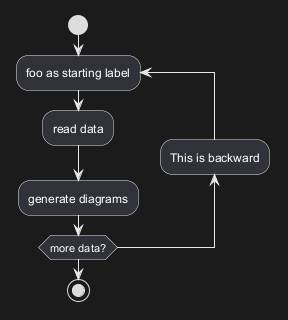
It is also possible to use a full action as repeat target and insert an action in the return path using the backward keyword.
🎉 Copied!

@startuml

start

repeat :foo as starting label;
  :read data;
  :generate diagrams;
backward:This is backward;
repeat while (more data?)

stop

@enduml

*[Ref. [QA-5826](https://forum.plantuml.net/5826/please-provide-action-repeat-loop-start-instead-condition?show=5831#a5831)]*

WARNING
 This translation need to be updated. 
WARNING

Break on a repeat loop [break]

You can use the break keyword after an action on a loop.
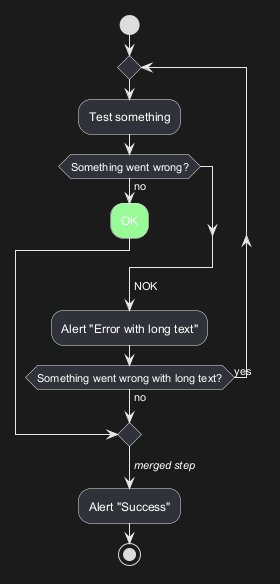
🎉 Copied!

@startuml
start
repeat
  :Test something;
    if (Something went wrong?) then (no)
      :OK; <<#palegreen>>
      break
    endif
    ->NOK;
    :Alert "Error with long text";
repeat while (Something went wrong with long text?) is (yes) not (no)
->//merged step//;
:Alert "Success";
stop
@enduml

[Ref. QA-6105]

Goto and Label Processing [label, goto]

⚠ It is currently only experimental 🚧

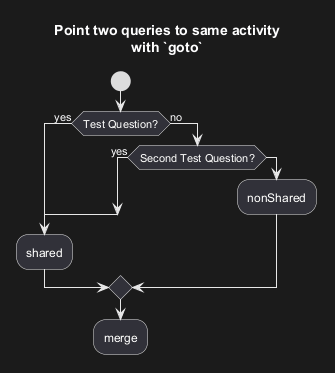
You can use label and goto keywords to denote goto processing, with:

🎉 Copied!

@startuml
title Point two queries to same activity\nwith `goto`
start
if (Test Question?) then (yes)
'space label only for alignment
label sp_lab0
label sp_lab1
'real label
label lab
:shared;
else (no)
if (Second Test Question?) then (yes)
label sp_lab2
goto sp_lab1
else
:nonShared;
endif
endif
:merge;
@enduml

[Ref. QA-15026, QA-12526 and initially QA-1626]

El ciclo While

Puedes usar las palabras reservadas while y end while para un ciclo repetitivo.
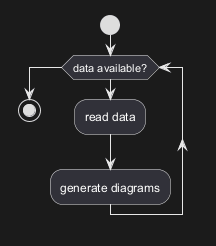
🎉 Copied!

@startuml

start

while (data available?)
  :read data;
  :generate diagrams;
endwhile

stop

@enduml

Es posible proporcionar una etiqueta después de la palabra reservada endwhile, o usar la palabra reservada is .
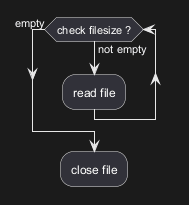
🎉 Copied!

@startuml
while (check filesize ?) is (not empty)
  :read file;
endwhile (empty)
:close file;
@enduml

WARNING
 This translation need to be updated. 
WARNING

Procesamiento paralelo

Puedes usar las palabras reservadas fork, fork again y end fork para denotar procesamientos paralelos.
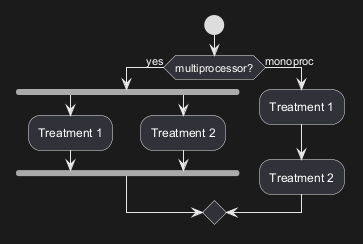
🎉 Copied!

@startuml

start

if (multiprocessor?) then (yes)
  fork
    :Treatment 1;
  fork again
    :Treatment 2;
  end fork
else (monoproc)
  :Treatment 1;
  :Treatment 2;
endif

@enduml

WARNING
 This translation need to be updated. 
WARNING

Split processing

Split

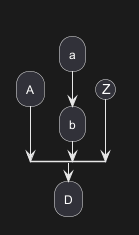
You can use split, split again and end split keywords to denote split processing.
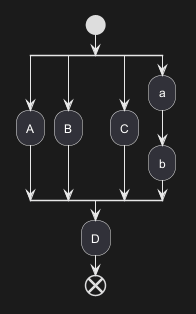
🎉 Copied!

@startuml
start
split
   :A;
split again
   :B;
split again
   :C;
split again
   :a;
   :b;
end split
:D;
end
@enduml

Input split (multi-start)

You can use hidden arrows to make an input split (multi-start):
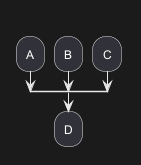
🎉 Copied!

@startuml
split
   -[hidden]->
   :A;
split again
   -[hidden]->
   :B;
split again
   -[hidden]->
   :C;
end split
:D;
@enduml

🎉 Copied!

@startuml
split
   -[hidden]->
   :A;
split again
   -[hidden]->
   :a;
   :b;
split again
   -[hidden]->
   (Z)
end split
:D;
@enduml

[Ref. QA-8662]

Output split (multi-end)

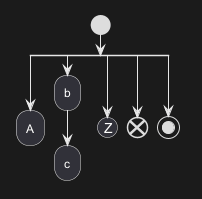
You can use kill or detach to make an output split (multi-end):
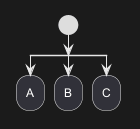
🎉 Copied!

@startuml
start
split
   :A;
   kill
split again
   :B;
   detach
split again
   :C;
   kill
end split
@enduml

🎉 Copied!

@startuml
start
split
   :A;
   kill
split again
   :b;
   :c;
   detach
split again
   (Z)
   detach
split again
   end
split again
   stop
end split
@enduml

Notas

Se puede aplicar formato a un texto usando sintaxis de WikiCreole.

Una nota puede ser flotante, usando la palabra clave floating.
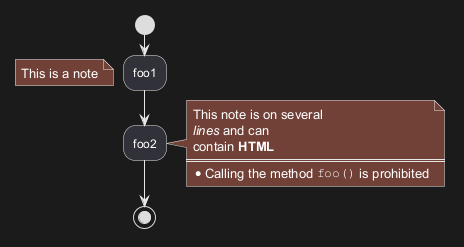
🎉 Copied!

@startuml

start
:foo1;
floating note left: This is a note
:foo2;
note right
  This note is on several
  //lines// and can
  contain <b>HTML</b>
  ====
  * Calling the method ""foo()"" is prohibited
end note
stop

@enduml

*[Ref. [QA-2398](https://forum.plantuml.net/2398/is-it-possible-to-add-a-comment-on-top-of-a-activity-partition?show=2403#a2403)]*

WARNING
 This translation need to be updated. 
WARNING

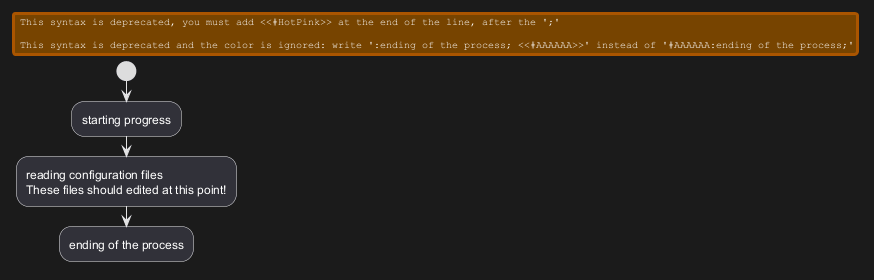
Colores

Puedes especificar colores en algunas actividades.
🎉 Copied!

@startuml

start
:starting progress;
#HotPink:reading configuration files
These files should edited at this point!;
#AAAAAA:ending of the process;

@enduml

*[Ref. [QA-4906](https://forum.plantuml.net/4906/setting-ad-hoc-gradient-backgrounds-in-activity?show=4917#a4917)]*

WARNING
 This translation need to be updated. 
WARNING

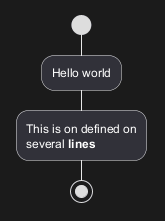
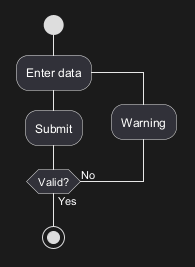
Lines without arrows

You can use skinparam ArrowHeadColor none in order to connect activities using lines only, without arrows.
🎉 Copied!

@startuml
skinparam ArrowHeadColor none
start
:Hello world;
:This is on defined on
several **lines**;
stop
@enduml

🎉 Copied!

@startuml
skinparam ArrowHeadColor none
start
repeat :Enter data;
:Submit;
backward :Warning;
repeat while (Valid?) is (No) not (Yes)
stop
@enduml

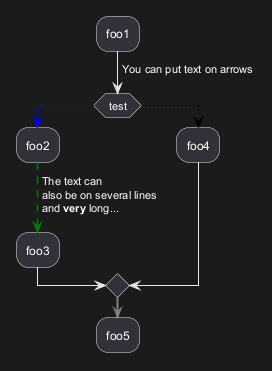
Flechas

Usando la notación ->, puedes añadir texto a una flecha y cambiar su color.

También es posible tener flechas punteadas, en linea discontinua, en negrita u ocultas.
🎉 Copied!

@startuml
:foo1;
-> You can put text on arrows;
if (test) then
  -[#blue]->
  :foo2;
  -[#green,dashed]-> The text can
  also be on several lines
  and **very** long...;
  :foo3;
else
  -[#black,dotted]->
  :foo4;
endif
-[#gray,bold]->
:foo5;
@enduml

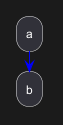
Simple colored arrow [link]

You can use simple colored arrow with the link keyword.
🎉 Copied!

@startuml
:a;
link #blue
:b;
@enduml

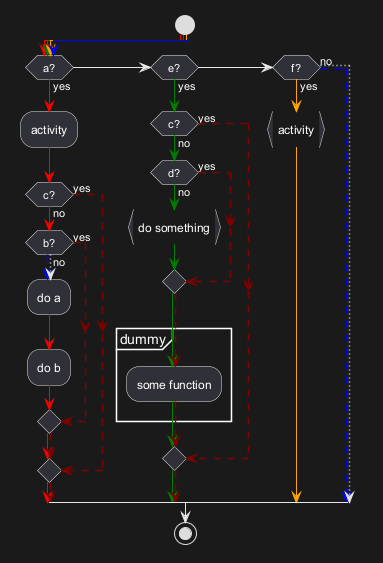
Multiple colored arrow

You can use multiple colored arrow.
🎉 Copied!

@startuml
skinparam colorArrowSeparationSpace 1
start
-[#red;#green;#orange;#blue]->
if(a?)then(yes)
-[#red]->
:activity;
-[#red]->
if(c?)then(yes)
-[#maroon,dashed]->
else(no)
-[#red]->
if(b?)then(yes)
-[#maroon,dashed]->
else(no)
-[#blue,dashed;dotted]->
:do a;
-[#red]->
:do b;
-[#red]->
endif
-[#red;#maroon,dashed]->
endif
-[#red;#maroon,dashed]->
elseif(e?)then(yes)
-[#green]->
if(c?)then(yes)
-[#maroon,dashed]->
else(no)
-[#green]->
if(d?)then(yes)
-[#maroon,dashed]->
else(no)
-[#green]->
:do something; <<continuous>>
-[#green]->
endif
-[#green;#maroon,dashed]->
partition dummy {
:some function;
}
-[#green;#maroon,dashed]->
endif
-[#green;#maroon,dashed]->

elseif(f?)then(yes)
-[#orange]->
:activity; <<continuous>>
-[#orange]->
else(no)
-[#blue,dashed;dotted]->
endif
stop
@enduml

[Ref. QA-4411]

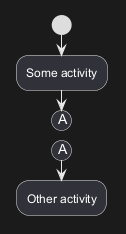
Connector (or Circle)

You can use parentheses to denote connector.
🎉 Copied!

@startuml
start
:Some activity;
(A)
detach
(A)
:Other activity;
@enduml

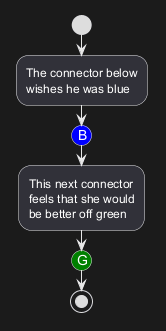
Color on connector

You can add color on connector.
🎉 Copied!

@startuml
start
:The connector below
wishes he was blue;
#blue:(B)
:This next connector
feels that she would
be better off green;
#green:(G)
stop
@enduml

[Ref. QA-10077]

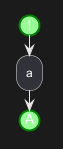
And even use style on Circle:

🎉 Copied!

@startuml
<style>
circle {
  Backgroundcolor palegreen
  LineColor green
  LineThickness 2
}
</style>

(1)
:a;
(A)
@enduml

[Ref. QA-19975]

Agrupación

Puedes agrupar actividades definiendo particiones:
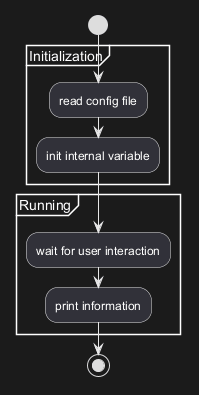
🎉 Copied!

@startuml
start
partition Initialization {
    :read config file;
    :init internal variable;
}
partition Running {
    :wait for user interaction;
    :print information;
}

stop
@enduml

*[Ref. [QA-2793](https://forum.plantuml.net/2793/activity-beta-partition-name-more-than-one-word-does-not-work?show=2798#a2798)]* *[Ref. [QA-542](https://forum.plantuml.net/542/ability-to-define-hyperlink-on-diagram-elements?show=14003#c14003)]*

WARNING
 This translation need to be updated. 
WARNING

Carriles

Usando la tecla pipe |, puedes definir carriles.

También es posible cambiar el color de los carriles.
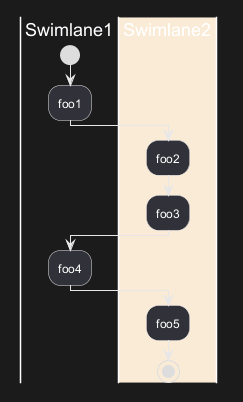
🎉 Copied!

@startuml
|Swimlane1|
start
:foo1;
|#AntiqueWhite|Swimlane2|
:foo2;
:foo3;
|Swimlane1|
:foo4;
|Swimlane2|
:foo5;
stop
@enduml

*[Ref. [QA-2681](https://forum.plantuml.net/2681/possible-define-alias-swimlane-place-alias-everywhere-else?show=2685#a2685)]*

WARNING
 This translation need to be updated. 
WARNING

Desacoplar y remover

Es posible remover una flecha usando la palabra reservada detach .
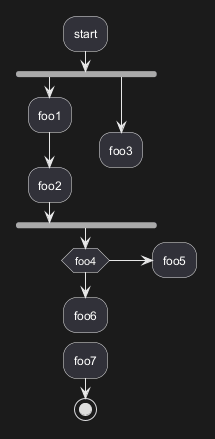
🎉 Copied!

@startuml
 :start;
 fork
   :foo1;
   :foo2;
 fork again
   :foo3;
   detach
 endfork
 if (foo4) then
   :foo5;
   detach
 endif
 :foo6;
 detach
 :foo7;
 stop
@enduml

Emoji as action (with icon stereotype)

You can use emoji as action, with the stereotype <<icon>>:
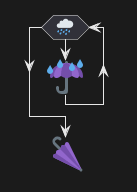
🎉 Copied!

@startuml
while (<:cloud_with_rain:>)
  :<:umbrella:>; <<icon>>
endwhile
-<<icon>><:closed_umbrella:>
@enduml

[Ref. GH-2436]

Otras formas de representación de actividades

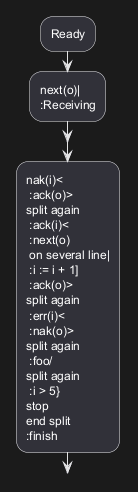
Cambiando el sepador final, ; , puedes configurar diferentes representaciones para una actividad:

🎉 Copied!

@startuml
:Ready;
:next(o)|
:Receiving;
split
 :nak(i)<
 :ack(o)>
split again
 :ack(i)<
 :next(o)
 on several line|
 :i := i + 1]
 :ack(o)>
split again
 :err(i)<
 :nak(o)>
split again
 :foo/
split again
 :i > 5}
stop
end split
:finish;
@enduml

WARNING
 This translation need to be updated. 
WARNING

UML (Unified Modeling Language) Shape (with UML stereotype)

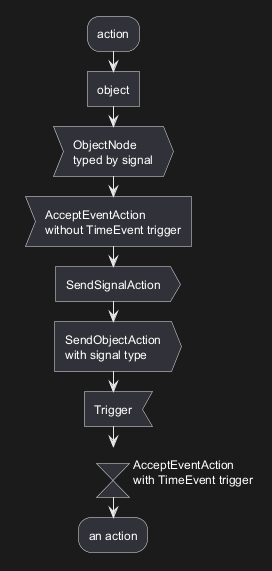
Table of UML Shape Name

Name Stereotype syntax
ObjectNode <<object>>
ObjectNode
typed by signal
<<objectSignal>> or <<object-signal>>
AcceptEventAction
without TimeEvent trigger
<<acceptEvent>> or <<accept-event>>
AcceptEventAction
with TimeEvent trigger
<<timeEvent>> or <<time-event>>
SendSignalAction

SendObjectAction
with signal type
<<sendSignal>> or <<send-signal>>
Trigger <<trigger>>

[Ref. GH-2185]

UML Shape Example using Stereotype

🎉 Copied!

@startuml
:action;
:object; <<object>>

:ObjectNode
typed by signal; <<objectSignal>>

:AcceptEventAction
without TimeEvent trigger; <<acceptEvent>>

:SendSignalAction; <<sendSignal>>

:SendObjectAction
with signal type; <<sendSignal>>

:Trigger; <<trigger>>

:\t\t\t\t\t\tAcceptEventAction
\t\t\t\t\t\twith TimeEvent trigger; <<timeEvent>>
:an action;
@enduml

[Ref. GH-2185, QA-16558, GH-1659]

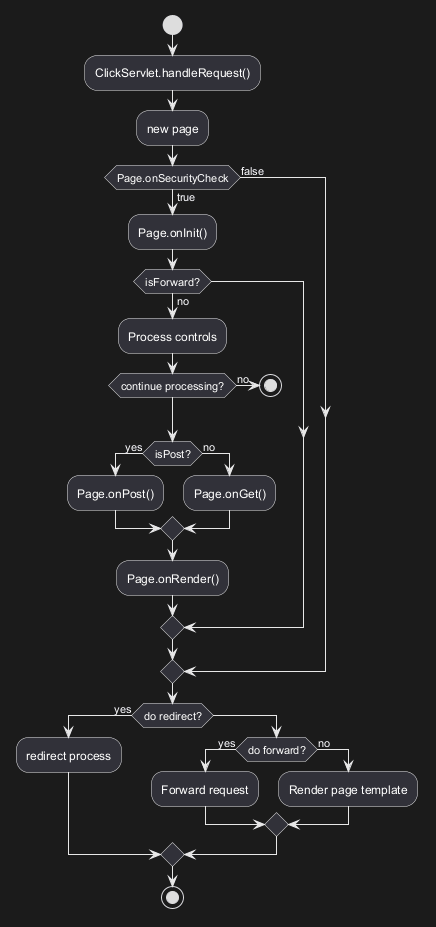
Ejemplo completo

🎉 Copied!

@startuml

start
:ClickServlet.handleRequest();
:new page;
if (Page.onSecurityCheck) then (true)
  :Page.onInit();
  if (isForward?) then (no)
    :Process controls;
    if (continue processing?) then (no)
      stop
    endif

    if (isPost?) then (yes)
      :Page.onPost();
    else (no)
      :Page.onGet();
    endif
    :Page.onRender();
  endif
else (false)
endif

if (do redirect?) then (yes)
  :redirect process;
else
  if (do forward?) then (yes)
    :Forward request;
  else (no)
    :Render page template;
  endif
endif

stop

@enduml

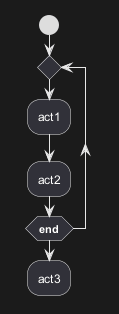
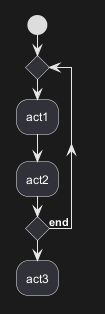
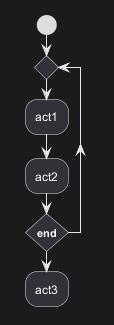
Condition Style

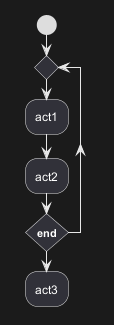
Inside style (by default)
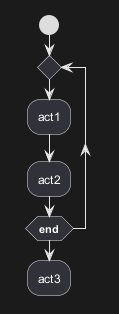
🎉 Copied!

@startuml
skinparam conditionStyle inside
start
repeat
  :act1;
  :act2;
repeatwhile (<b>end)
:act3;
@enduml

🎉 Copied!

@startuml
start
repeat
  :act1;
  :act2;
repeatwhile (<b>end)
:act3;
@enduml

Diamond style

🎉 Copied!

@startuml
skinparam conditionStyle diamond
start
repeat
  :act1;
  :act2;
repeatwhile (<b>end)
:act3;
@enduml

InsideDiamond (or Foo1) style

🎉 Copied!

@startuml
skinparam conditionStyle InsideDiamond
start
repeat
  :act1;
  :act2;
repeatwhile (<b>end)
:act3;
@enduml

🎉 Copied!

@startuml
skinparam conditionStyle foo1
start
repeat
  :act1;
  :act2;
repeatwhile (<b>end)
:act3;
@enduml

[Ref. QA-1290 and #400]

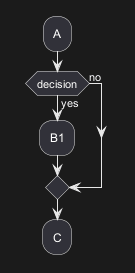
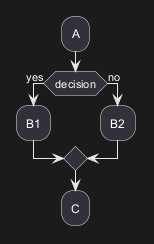
Condition End Style

Diamond style (by default)

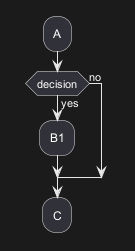
🎉 Copied!

@startuml
skinparam ConditionEndStyle diamond
:A;
if (decision) then (yes)
    :B1;
else (no)
endif
:C;
@enduml

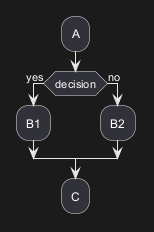
🎉 Copied!

@startuml
skinparam ConditionEndStyle diamond
:A;
if (decision) then (yes)
    :B1;
else (no)
    :B2;
endif
:C;
@enduml
@enduml

Horizontal line (hline) style

🎉 Copied!

@startuml
skinparam ConditionEndStyle hline
:A;
if (decision) then (yes)
    :B1;
else (no)
endif
:C;
@enduml

🎉 Copied!

@startuml
skinparam ConditionEndStyle hline
:A;
if (decision) then (yes)
    :B1;
else (no)
    :B2;
endif
:C;
@enduml
@enduml

[Ref. QA-4015]

Using (global) style

Without style (by default)
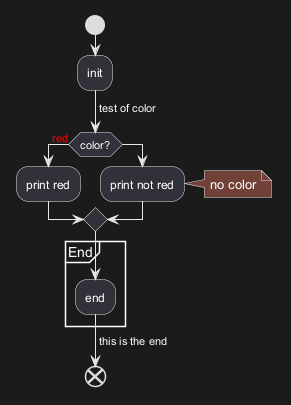
🎉 Copied!

@startuml
start
:init;
-> test of color;
if (color?) is (<color:red>red) then
:print red;
else 
:print not red;
note right: no color
endif
partition End {
:end;
}
-> this is the end;
end
@enduml

With style

You can use style to change rendering of elements.
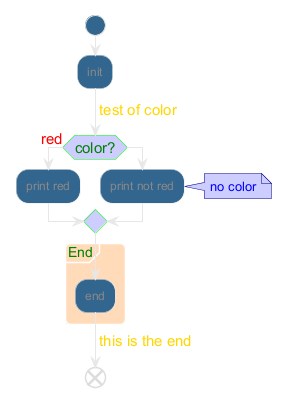
🎉 Copied!

@startuml
<style>
activityDiagram {
  BackgroundColor #33668E
  BorderColor #33668E
  FontColor #888
  FontName arial

  diamond {
    BackgroundColor #ccf
    LineColor #00FF00
    FontColor green
    FontName arial
    FontSize 15
  }
  arrow {
    FontColor gold
    FontName arial
    FontSize 15
  }
  partition {
    LineColor red
    FontColor green
    RoundCorner 10
    BackgroundColor PeachPuff
  }
  note {
    FontColor Blue
    LineColor Navy
    BackgroundColor #ccf
  }
}
document {
   BackgroundColor transparent
}
</style>
start
:init;
-> test of color;
if (color?) is (<color:red>red) then
:print red;
else 
:print not red;
note right: no color
endif
partition End {
:end;
}
-> this is the end;
end
@enduml

Creole on Activity

You can use Creole or HTML Creole on Activity diagram:
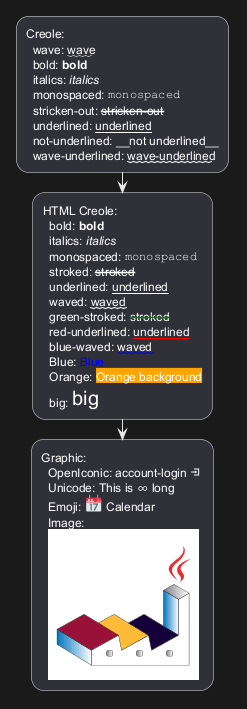
🎉 Copied!

@startuml
:Creole:
  wave: ~~wave~~
  bold: **bold**
  italics: //italics//
  monospaced: ""monospaced""
  stricken-out: --stricken-out--
  underlined: __underlined__
  not-underlined: ~__not underlined__
  wave-underlined: ~~wave-underlined~~;
:HTML Creole:
  bold: <b>bold
  italics: <i>italics
  monospaced: <font:monospaced>monospaced
  stroked: <s>stroked
  underlined: <u>underlined
  waved: <w>waved
  green-stroked: <s:green>stroked
  red-underlined: <u:red>underlined
  blue-waved: <w:#0000FF>waved
  Blue: <color:blue>Blue
  Orange: <back:orange>Orange background
  big: <size:20>big;
:Graphic:
  OpenIconic: account-login <&account-login> 
  Unicode: This is <U+221E> long
  Emoji: <:calendar:> Calendar
  Image:
  <img:https://plantuml.com/logo3.png>;
@enduml