





New! Render PlantUML diagrams directly inside GitHub
with our official browser extension —
No server. No tokens. No tracking. Zero permissions but clipboard. —
Try it out and let us know what you think!
OAuth2 configuration
 Edit in Dokuwiki
 Edit in Asciidoc
 Edit in Markdown
client_credentials and password (Resource Owner Password Credentials).
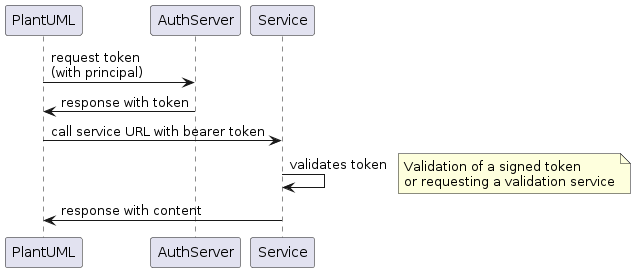
An OAuth2 credentials configuration file must be stored in the folder configured by the property plantuml.security.credentials.path. The file extension is .credential, the file content is structured in JSON, the charset encoding is UTF-8, the filename must match the UserInfo part of the URL. OAuth2 client credentials flow
Flow
OAuth2 client_credentials JSON structure:
{
  "name": "<name of the configuration>",
  "type": "oauth",
  "identifier": "<principal identifier>",
  "secret": "<principal secret>",
  "properties": {
    "grantType": "client_credentials",
    "accessTokenUri": "<URL to token access controler>",
    "scope": "<access scopes>"
  },
  "proxy": {
    "type": "<proxy type>",
    "address": "<proxy server address>",
    "port": "<proxy server port>"
  }
}
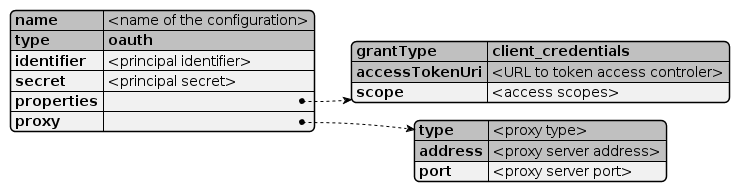
name: required- The name of the configuration and should be similar to the file name
type:oauthrequired- Defines an OAuth2 flow
identifier: required- Principal identifier name
secret:- Secret for the principal (not encrypted)
properties.grantType:client_credentialsrequired- Defines the OAuth2 client credentials flow
properties.accessTokenUri: required- URI to the AuthServer token access controller. If PlantUML is configured to work with an allow-list, this controller URI must be added to the list (see also security configuration)
properties.scope:- Access tokens to request (e.g.
read write) proxy:- Optional proxy configuration (overrides system proxy settings)
proxy.type: required (direct,socks,http)- Proxy type definition.
proxy.address: required- Proxy server address (hostname, IP address)
proxy.port:- Proxy server port number
{
  "name": "curity-demo",
  "type": "oauth",
  "identifier": "demo-backend-client",
  "secret": "MJlO3binatD9jk1",
  "properties": {
    "grantType": "client_credentials",
    "scope": "read write",
    "accessTokenUri": "https://login-demo.curity.io/oauth/v2/oauth-token"
  }
}
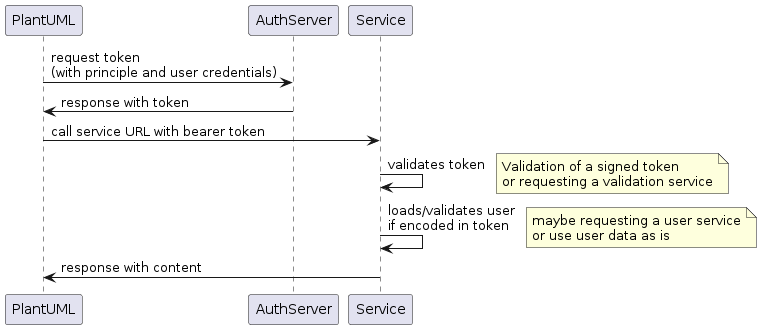
OAuth2 resource owner password credentials flow
Flow
OAuth2 password JSON structure:
{
  "name": "<name of the configuration>",
  "type": "oauth",
  "identifier": "<principal identifier>",
  "secret": "<principal secret>",
  "properties": {
    "grantType": "password",
    "accessTokenUri": "<URL to token access controler>",
    "scope": "<access scopes>",
    "resourceOwner": {
      "identifier": "<resource owner name>",
      "secret": "<resource owner secret>"
    }
  },
  "proxy": {
    "type": "<proxy type>",
    "address": "<proxy server address>",
    "port": "<proxy server port>"
  }
}

name: required- The name of the configuration and should be similar to the file name
type:oauthrequired- Defines an OAuth2 flow
identifier: required- Principal identifier name
secret:- Secret for the principal (not encrypted)
properties.grantType:passwordrequired- Defines the OAuth2 resource owner password credentials flow
properties.accessTokenUri: required- URI to the AuthServer token access controller. If PlantUML is configured to work with an allow-list, this controller URI must be added to the list (see also security configuration)
properties.scope:- Access tokens to request (e.g.
read write) properties.resourceOwner.identifier:- Resource owner name, who requests the access
properties.resourceOwner.secret:- Resource owner password
proxy:- Optional proxy configuration (overrides system proxy settings)
proxy.type: required (direct,socks,http)- Proxy type definition.
proxy.address: required- Proxy server address (hostname, IP address)
proxy.port:- Proxy server port number
{
	"name": "oauth-example",
	"type": "oauth",
	"identifier": "demo-backend-client",
	"secret": "MJlO3binatD9jk1",
	"properties": {
		"grantType": "password",
		"scope": "read write",
		"accessTokenUri": "https://login-demo.curity.io/oauth/v2/oauth-token",
		"resourceOwner": {
			"identifier": "alice",
			"secret": "secret"
		}
	}
}
(Please note, login-demo.curity.io actually stopped the support for 'password' grant type)